Self-service customer support: what it is and how to build it in 2026
 12 minutes
 14.07.2026
Every support ticket that reaches a human agent costs time, money, and a bit of the customer’s patience. Most of those tickets ask something your team has already answered a hundred times: how do I reset my password, where’s my invoice, why did my integration stop syncing. Self-service customer support exists to catch those questions before they ever become a ticket, letting your knowledge base and AI agent resolve them while your team sleeps.
That single shift changes the economics of an entire support organization.
This guide covers what self-service customer support actually means, when it beats live support (and when it doesn’t), the channels worth building, and a concrete six-step plan for rolling it out in a B2B SaaS team. It also covers how to measure whether it’s working, and how to pick software that supports the whole approach instead of just one channel.
What is self-service customer support?
Self-service customer support is a model where customers resolve their own issues using a knowledge base, an AI agent (sometimes called a virtual assistant), a community forum, or in-app guidance, without waiting in a queue for a live agent. Customer self-service, self-serve support, and self-service customer service all describe the same idea: moving resolution from a human queue to always-available resources.
It’s a narrower idea than “customer service automation.” Automation covers anything that removes manual work from an agent’s day, including ticket routing, tagging, and internal triage that a customer never sees. Self-service specifically means the customer completes the resolution themselves. A help center article that answers “how do I reset my password” is self-service. A rule that automatically tags a billing ticket as high priority is automation, but it’s not self-service, because a human agent still closes the loop.
For B2B SaaS teams, the distinction matters for headcount planning: automation makes each agent faster, but self-service removes tickets from the queue entirely.
Why self-service customer support matters
Self-service customer support matters because it cuts ticket volume, lowers the cost of every resolved issue, and gives customers a 24/7 answer without anyone on call at 2 a.m. For a growing SaaS product, that means support headcount stops scaling one-to-one with the customer base.
The cost argument is the easiest one to make to a CFO. In a McKinsey analysis of an AI-enabled customer service rollout at a large bank, self-service channel use doubled to tripled and cost-to-serve fell by more than 20 percent within 12 months (McKinsey, 2023). Fewer tickets reach a paid agent. The ones that do tend to be the complex, higher-value cases where a human actually adds judgment instead of repeating a KB article by phone.
The same pattern shows up whenever a support org shifts real volume away from live agents. Cost per resolved ticket drops, average handle time on the remaining queue improves because it’s no longer diluted by simple requests, and the team stops feeling like it’s permanently behind.
Speed compounds the effect. A customer who finds the answer in 30 seconds never opens a ticket at all, so that resolution never touches your average response time, your queue depth, or your CSAT survey. Customer expectations have already shifted ahead of what most support teams currently deliver, which is exactly the gap a self-service strategy is built to close.
Self-service works when it removes tickets, not when it just makes them faster to close. A chatbot that reads a script and still ends every conversation with “let me transfer you to an agent” just adds extra steps to the same queue. The bar is resolution, not deflection theater.
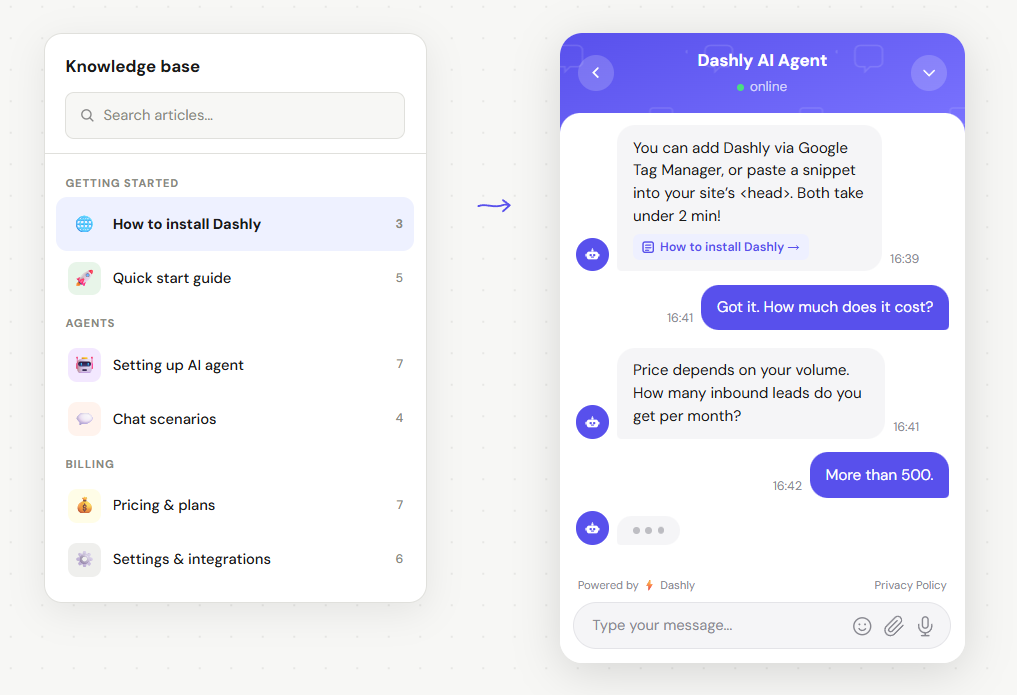
This is where an AI Support Agent earns its place in the stack. Support volume grows faster than most teams can hire for it. The mechanism that keeps pace is an AI agent that reads your knowledge base directly and answers in natural language, rather than a menu of canned replies, and only hands off to a person when its own confidence is low, freeing up agent time that goes straight back into the complex cases self-service can’t touch.
Here’s an example of a conversation with an AI agent:
Self-service vs. live support: when each wins
Self-service wins for repetitive, well-documented questions: password resets, billing basics, plan comparisons, common how-tos. Live support wins when the issue is ambiguous, emotionally charged, or touches money and account risk, where the customer needs judgment rather than documentation. A good self-service customer support strategy routes each ticket toward whichever channel resolves it at the lowest cost without lowering the outcome.
Reader expectations already lean this way. Zendesk’s 2025 CX Trends report found that 75% of CX leaders expect 80% of customer interactions to be resolved without a human touching them at all within the next few years, and 67% of consumers say they’re ready to hand routine tasks like order tracking to an AI assistant (Zendesk, 2025). The strategy work now is routing the remaining cases well, not debating whether to build toward that expectation.
Three signals usually tell you who should handle a query:
- Has this exact question been asked and answered before, in roughly the same words? If yes, it belongs in self-service.
- Does resolving it require account-specific judgment, like a refund exception or a contract change? That needs a person.
- Is the customer already frustrated or escalating in tone? Route it to a human immediately, even if the underlying question is simple, because a stressed customer handed back to a bot reads as being ignored.
The failure mode to avoid is forcing self-service where it doesn’t fit, just to hit a deflection target.
That’s a real risk. Push too hard on deflection and customers learn to route around your self-service tools entirely, hunting for a “contact us” link buried three clicks deep. The healthier target is a self-service layer confident enough to say “I don’t have a good answer for this, connecting you with a person” instead of guessing.
Core channels and tools for self-service support
The core channels for self-service customer support are a searchable knowledge base, an AI agent that answers in natural language, a community forum for peer-to-peer answers, and in-app guidance for product-specific questions. Most B2B SaaS teams run an omnichannel mix of three or four of these together rather than betting on just one.
Knowledge base and help center
A searchable knowledge base is the foundation everything else sits on, including your AI agent, since it can only answer as well as the content it’s reading from. The bar for a good knowledge base article is whether a customer can act on it in under a minute: one clear answer, one screenshot if needed, one link to the related feature.
Search quality matters more than article count. A help center with 40 well-tagged, up-to-date articles that surface the right one on the first search beats one with 400 stale articles that bury the answer on page two.
AI agents and chatbots
An AI agent is the layer that turns a static knowledge base into a conversation, usually delivered through the same live chat widget customers already use to reach a human. Instead of a customer searching for the right article themselves, they describe the problem in their own words and the agent, built on generative AI rather than a fixed script, pulls the relevant answer, adapts it to their specific account context, and resolves the ticket without a handoff.
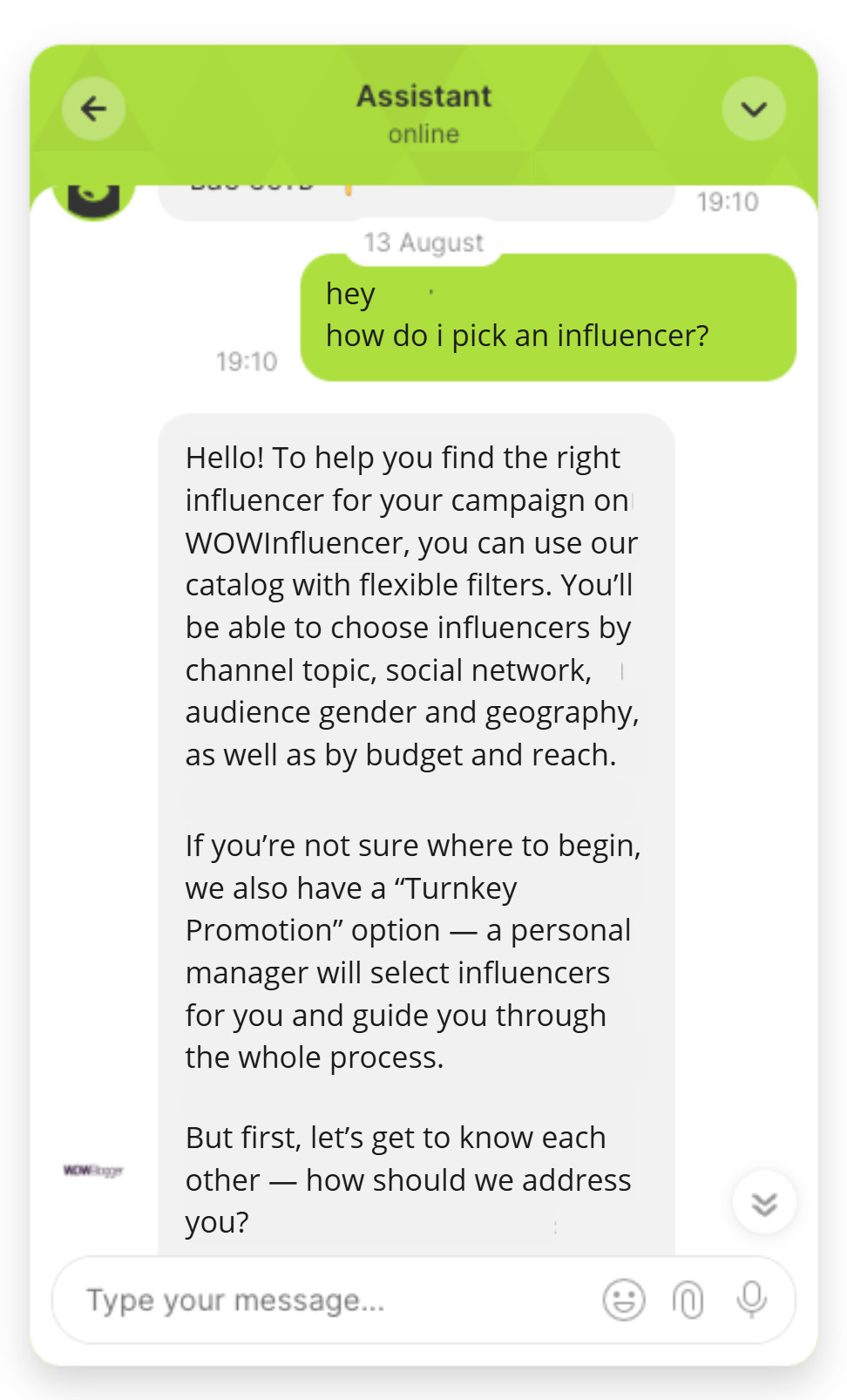
Not every “AI chatbot” does this. A scripted bot with a decision tree of buttons is still self-service in the loose sense, but it caps out fast: the moment a question doesn’t match a pre-written branch, the customer is stuck. A chatbot built for support that’s actually agentic can handle open-ended phrasing, pull account data, and only escalate the genuinely hard cases, which is the difference between a real resolution and a longer path to the same queue.
Here’s how the AI agent handles open-ended questions:
Community forums
A community forum lets customers answer each other, which works well for products with power users who enjoy sharing workarounds and integrations the vendor hasn’t documented yet. It’s a slower channel than an AI agent (answers can take hours, not seconds), so it’s a complement to the other channels, not a replacement.
IVR and phone self-service
Interactive voice response still has a place for account lookups and status checks over the phone, but it’s the weakest channel for B2B SaaS specifically, where most support starts in-product or over chat rather than by phone. Most SaaS teams keep IVR minimal or skip it entirely.
In-app self-service
Contextual help inside the product, tooltips, guided checklists, and an embedded help widget catches questions at the exact moment they come up, before a customer even opens a new tab to search. It’s often the highest-leverage channel because it meets the customer inside the workflow where the confusion happened, which is also why strong onboarding flows quietly double as a self-service channel: a well-designed first session answers most “how do I…” questions before they’re ever asked.
How to build a self-service customer support strategy in 6 steps
Building a self-service customer support strategy starts with auditing what your team already answers most often, then building the resources and AI resolution layer to handle those cases without an agent, and finally measuring whether tickets actually drop. The six steps below are ordered so each one depends on the last.
- Audit top recurring tickets. Pull the last 90 days of tickets and tag them by topic. In most B2B SaaS teams, a small handful of topics (billing, login, a specific integration) account for the bulk of volume.
- Build a searchable knowledge base. Write one clear article per recurring topic before anything else. An AI agent trained on a thin knowledge base will confidently give wrong answers, which is worse than no self-service at all.
- Deploy an AI agent for tier-1 resolution. Connect the agent to the knowledge base so it resolves the recurring topics directly in chat, in natural language, instead of pointing customers to search for themselves.
- Design escalation logic to human agents. Set a clear confidence threshold and a clear list of topics (refunds, security, anything account-specific) that always route to a person, no exceptions.
- Measure deflection rate and CSAT. Track what percentage of conversations the agent resolves without escalation, whether that counts as genuine first contact resolution rather than a reopened ticket, and whether CSAT on those resolutions holds up against live-agent CSAT. A framework like the one in this customer service KPI breakdown makes the numbers comparable.
- Iterate on content gaps. Every escalation is a signal. If the same question keeps escalating, that’s a missing or outdated knowledge base article, not an AI problem.
Step 3 is usually where teams stall, because deploying an AI agent feels like a bigger lift than it is. Dashly’s approach with its tier-1 resolution agent is to point the agent at content you already have, rather than rewriting it into a separate bot-specific format, so the rollout is closer to a connection than a rebuild.
Step 5 deserves more attention than most teams give it. Deflection rate on its own is a vanity number if CSAT quietly drops alongside it. Pair the two, and pressure-test them against the broader set of numbers in this support and chat metrics guide, so a change in one doesn’t hide a regression in another.
Choosing self-service customer support software
The right self-service customer support software integrates directly with your existing knowledge base, resolves tickets in natural language rather than a fixed decision tree, reports deflection and CSAT side by side, and routes escalations to the right human queue automatically. Missing any one of those four turns “self-service software” into just another chat widget.
Evaluate on integration depth before anything else. A tool that requires you to duplicate your help center content into a separate proprietary format adds ongoing maintenance debt every time a product feature changes. Evaluate on escalation quality next: ask any vendor to show you what happens when the agent doesn’t know the answer, not just what happens when it does.
👉 For a full side-by-side comparison across vendors, see this breakdown of best AI customer support tools.
Conclusion
Self-service customer support isn’t a chatbot bolted onto a help center. It’s a deliberate shift of resolution away from a human queue, built on a knowledge base worth trusting, an AI agent that actually resolves rather than just replies, and escalation logic that protects the cases where a person genuinely adds value.
Done well, it lowers cost-to-serve, answers customers at any hour, and frees your team to spend their time on the tickets that need a human. Done poorly, it’s a maze of buttons that customers learn to route around. The difference comes down to whether you measure resolution, not just deflection, and whether you keep iterating on the knowledge base every time a ticket escalates.
Frequently asked questions
Self-service customer support is a model where customers resolve issues themselves through a knowledge base, an AI agent, a community forum, or in-app guidance, without waiting for a live agent.
Common examples include a searchable help center, an AI agent that answers questions in chat, a community forum, in-app tooltips and guided checklists, and a customer portal where users track orders or manage their own account.
Generally yes. In a McKinsey analysis of an AI-enabled service rollout (mckinsey.com, 2023), cost-to-serve fell by more than 20 percent as self-service channel use doubled to tripled, since fewer tickets ever reach a paid live agent.
Track deflection rate (the share of conversations resolved without human escalation) alongside CSAT and first contact resolution on those conversations, and compare all three against your overall ticket volume trend and average resolution time.
No. AI resolves repetitive, well-documented questions well, but ambiguous, emotionally charged, or account-specific issues still need a human agent with judgment. The goal is routing each request to the right channel, not eliminating live support.
Automation covers any process that removes manual work from an agent, including ticket routing and tagging the customer never sees. Self-service specifically means the customer completes the resolution themselves. See this guide to customer service automation for the broader picture.
Look for software that integrates with your existing knowledge base, resolves questions in natural language rather than a fixed menu, reports deflection and CSAT together, and routes escalations to the right team automatically.
It works best as an omnichannel layer rather than a single tool: a knowledge base and AI agent in live chat, an in-app help widget, and a community forum, each catching different types of questions.
In practice, yes. Virtual assistant is an older term for the same idea: software that reads a knowledge base and resolves customer questions in natural language without a human agent. See this rundown of customer service chatbots for where scripted bots fit versus fully agentic support.



![Ready-made answers to 4 most tricky customer queries [Infographics]](https://www.dashly.io/blog/wp-content/uploads/2020/10/15-Examples-of-Tricky-Customer-Service-Scenarios-Ready-Made-Answers-720x317.jpg)

![Customer Service Role Play Scripts: 16 Scenarios + Free PDF [2026]](https://www.dashly.io/blog/wp-content/uploads/2023/03/Role-playing-templates-for-customer-service-720x317.png)