12 examples of AI in customer service: What B2B SaaS teams are actually deploying in 2026
 19 minutes
 22.06.2026
Most articles about AI in customer service read the same way: a list of capabilities, a few enterprise logos, and a conclusion that sounds like “AI is transforming everything.” What they skip is which of those capabilities a 50-person B2B SaaS team actually deploys first, what metrics to watch in week two, and where deployments quietly fail.
Each of the 12 examples below covers the mechanism behind it, the outcome it produces, and the ticket profile where it pays back within 90 days. The range runs from basic ticket routing to agentic AI that resolves issues end-to-end without human involvement.
What is AI in customer service?
AI in customer service is the use of machine learning, natural language processing (NLP), and generative AI to handle, triage, or augment customer interactions without agents touching every case. It covers ticket routing, self-service deflection, response drafting, sentiment monitoring, and fully autonomous issue resolution. The goal is not to replace agents but to remove the work that doesn’t require a human judgment call.
For B2B SaaS, the ROI math centers on three metrics: deflection rate (tickets resolved without a human), time-to-resolution (how long a customer waits for a complete answer), and CSAT or CES delta (whether customers who interacted with AI report higher or lower satisfaction than those handled by a human agent).
The technology stack behind most deployments has three components: an NLP or LLM layer that reads and classifies customer messages, a decision layer that determines the right action, and an integration layer that connects to your help desk, CRM, and knowledge base. The integration layer is usually what separates a useful deployment from a frustrating one.
12 examples of AI in customer service
The 12 examples below cover first-response automation, self-service FAQ deflection, generative AI response drafting, sentiment analysis, conversational AI for qualification, predictive churn detection, IVR replacement, multilingual support, omnichannel context continuity, proactive trigger-based outreach, post-sale success check-ins, and agentic AI for end-to-end resolution. Each fits a different starting point depending on your ticket profile and team size.
| # | Example | Primary metric | Best starting point for |
|---|---|---|---|
| 1 | First-response automation | Response time: hours → under 5 min | Teams with 200+ tickets/month spending 30%+ of handle time on triage |
| 2 | Self-service FAQ deflection | Deflection rate 20–35% | KB with 100+ articles; high-frequency low-complexity tickets |
| 3 | Agent-assist drafting | Handle time −30–50% | Complex tickets requiring multi-step answers |
| 4 | Sentiment escalation | CSAT recovery on at-risk accounts | Enterprise accounts above $10K ARR |
| 5 | Inbound qualification | Expansion MRR from CS conversations | CS-led upsell motion; product-led growth |
| 6 | Predictive churn detection | NRR improvement | Annual contracts; accounts above $5K ARR |
| 7 | AI IVR replacement | Routing accuracy; CSAT improvement | Teams with 500+ calls/month |
| 8 | Multilingual NLU | Support coverage without headcount | Multi-region expansion |
| 9 | Omnichannel continuity | CSAT on multi-touch tickets | Teams running chat + email + phone simultaneously |
| 10 | Proactive trigger outreach | Combined deflection 40–55% | Teams with product usage data pipeline |
| 11 | Post-sale success check-ins | NRR; churn reduction | CS teams managing 200+ accounts per manager |
| 12 | Agentic AI resolution | Autonomous handling rate | Mature CS ops; well-documented authorization scope |
1. First-response automation and smart ticket routing
First-response automation closes the gap between when a ticket arrives and when a human agent acts on it. For most B2B SaaS support teams, that gap averages 4 to 12 hours. AI closes it in seconds.
The mechanism: an NLP model reads the incoming message, classifies it by intent category (billing question, feature request, bug report, access issue), and enriches it with the customer’s CRM data, subscription tier, and support history. The enriched ticket routes to the correct queue, often with a pre-drafted first response attached for the agent to review and send.
The outcome is measurable from day one. Teams running this pattern report first-response time dropping from hours to under 5 minutes on automated categories. Deflection rate on first-response alone typically lands between 15 and 25%, depending on how closely the intent categories match real ticket distribution. According to the Salesforce State of Service 2024, 83% of service teams using AI report a significant improvement in first-contact resolution.
This example works best when your ticket volume exceeds 200 per month and your team spends 30% or more of handle time just reading, categorizing, and routing. That ratio is the signal that the sorting problem is eating actual capacity.
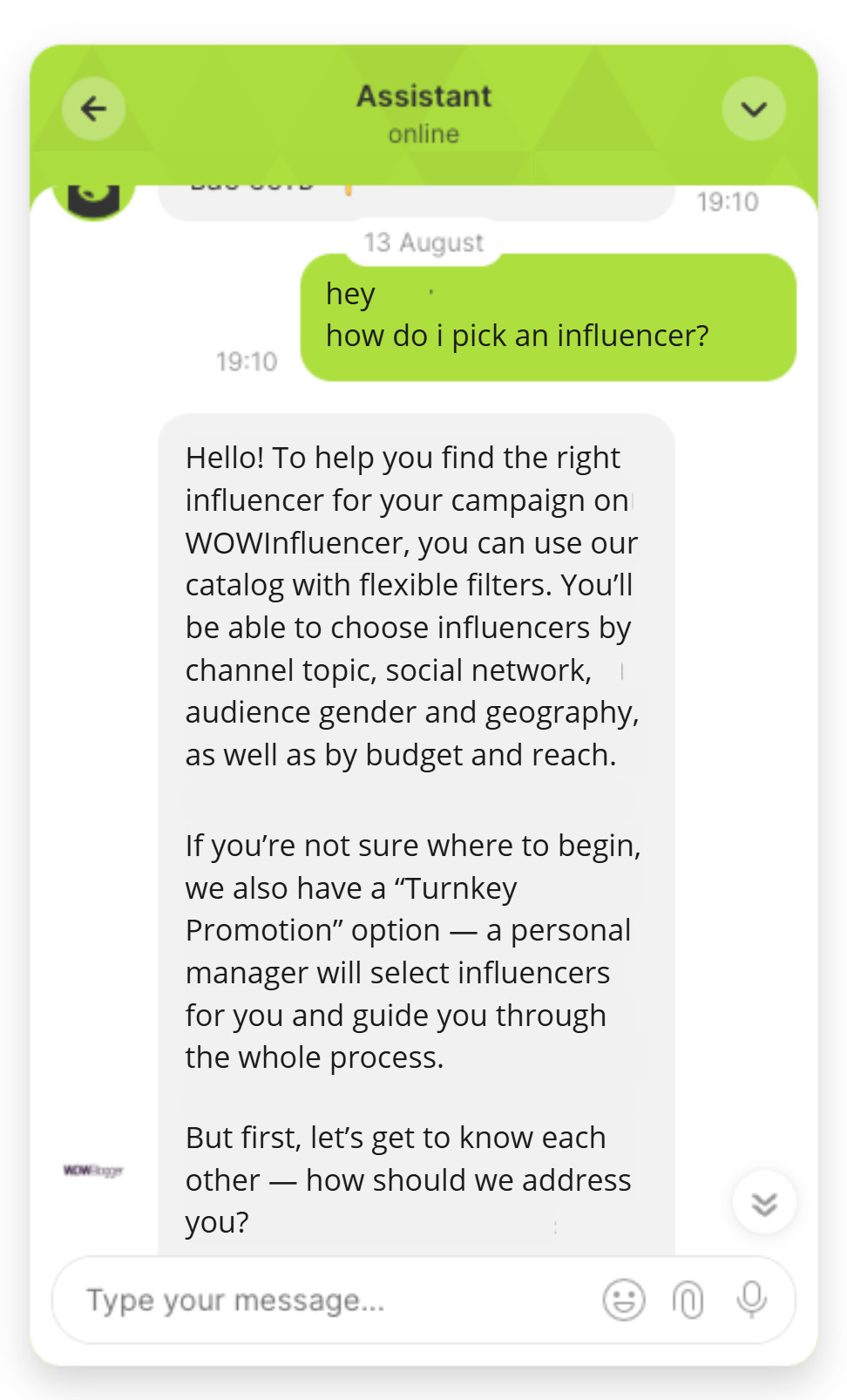
Dashly’s AI Support Agent handles first-response triage and ticket routing natively. It reads the full conversation context, matches against your knowledge base, and routes anything it cannot resolve with sufficient confidence to the right team member, with a context summary attached.
Here’s how the AI agent supports users:
2. Self-service FAQ deflection via AI chatbot
Self-service deflection is the highest-ROI starting point for most B2B SaaS teams. The math is direct: average cost per ticket is $10 to $16 per interaction according to Freshworks research, and a well-configured AI can deflect 20 to 35% of inbound volume within the first 30 days without human involvement.
The mechanism: the AI performs semantic search over your existing knowledge base when a customer submits a question. If confidence exceeds a configured threshold (typically around 85%), it surfaces the answer and closes the case. Below that threshold, it escalates to a human with the relevant KB articles pre-loaded for faster resolution.
Deflection rate depends heavily on KB quality. A sparse or outdated knowledge base caps deflection around 10 to 15%. A well-maintained KB with 200-plus articles covering your real ticket categories reaches 30 to 35% within 60 days as the model learns from escalation patterns.
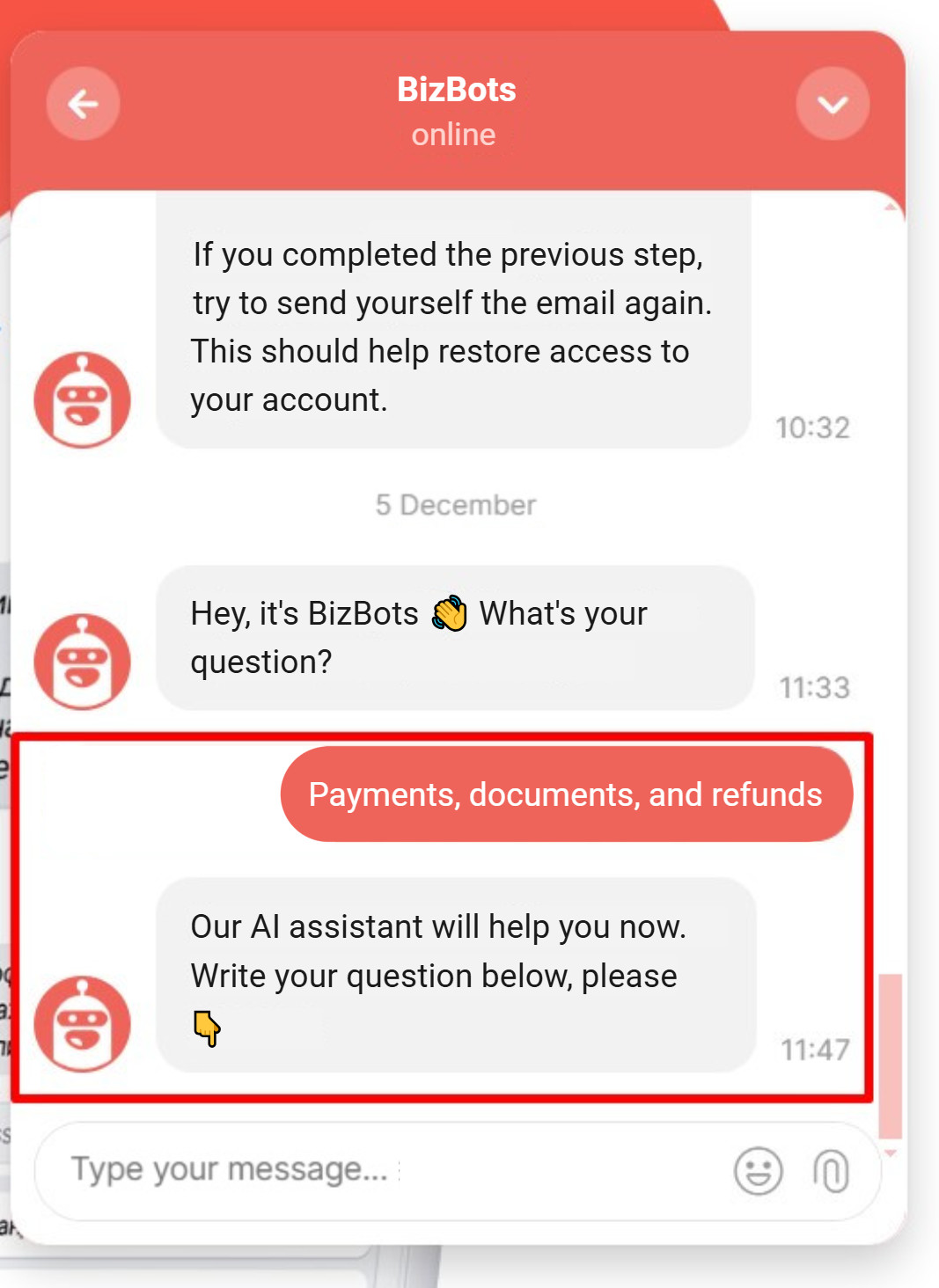
At 30% deflection on 500 monthly tickets: 150 tickets at $12 average cost = $1,800 saved per month. That figure compounds when you factor in agent time freed for complex cases that require judgment. For a deeper look at how to configure the chatbot layer for maximum deflection rate, customer service chatbots covers the setup decisions that separate high-deflection from low-deflection deployments.
Here’s an AI agent handling specific FAQs related to payments:
3. Generative AI response drafting (agent-assist)
Agent-assist is different from automation. The AI drafts a response, the agent reviews it, and the agent sends it. No customer ever receives a message that hasn’t passed human judgment.
The mechanism: when a ticket lands in the queue, the LLM synthesizes the relevant KB articles, the customer’s history, and the ticket content into a draft response. The agent edits or approves. Handle time on assisted tickets runs 30 to 50% shorter than unassisted ones, because the agent is editing rather than composing from scratch.
This example fits complex tickets well: feature questions with multi-step answers, bug reports that need changelog context, billing questions that require account history. It is the right tool for cases where full automation would produce unacceptable error rates but manual response is slower than the SLA allows.
One guardrail matters here: disable agent-assist drafting on tickets flagged as high-risk by sentiment analysis (see example 4). A generative draft on a customer who is cancelling after a product failure reads as tone-deaf, regardless of how technically accurate it is.
4. Sentiment analysis and real-time escalation
Sentiment analysis reads emotional tone in real-time and routes negative interactions to a senior agent before the customer escalates or churns. For B2B SaaS, where a single enterprise account can represent significant ARR, catching a frustrated customer before they open a cancellation request is often the highest-leverage use of AI in the support queue.
The mechanism: the model scores each message on a negative-to-positive scale. When a conversation crosses a negativity threshold, it fires an escalation rule: reassign to a senior agent, trigger a manager notification, or add the account to a churn-risk list in the CRM. The escalation is invisible to the customer; they see a faster, more attentive response.
Best-practice configuration pairs sentiment escalation with a human callback within 2 hours for any account above a defined revenue threshold. The outcome is CSAT recovery on accounts that would otherwise churn quietly without ever filing a formal complaint ticket.
5. Conversational AI for inbound qualification (CS meets sales)
Most CS teams don’t think of support conversations as sales moments. That is a mistake, particularly during onboarding or feature-discovery conversations where upgrade intent surfaces naturally.
Conversational AI for qualification captures those signals: the AI reads the conversation for intent cues (questions about plan limits, requests for features on a higher tier, mentions of a team growing beyond the current seat count) and flags the account for an expansion conversation. The handoff goes to a CS-led upsell motion or directly to sales.
This differs from typical conversational AI for customer service because the goal here is recognition: identifying the moment before the customer would search for a competitor or submit an upgrade request, and routing it proactively.
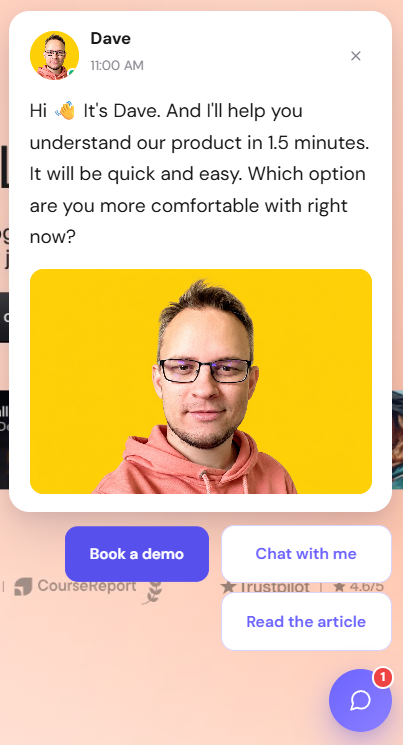
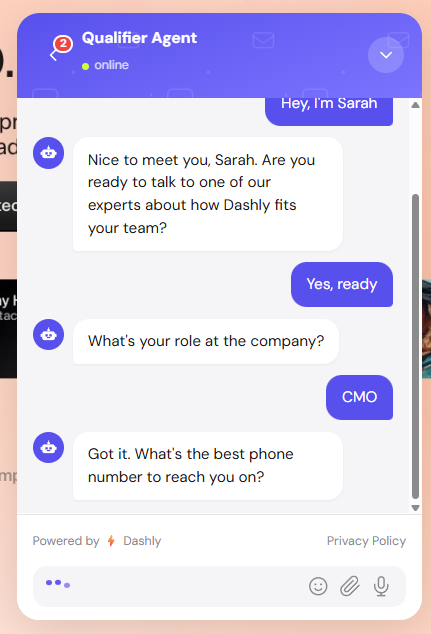
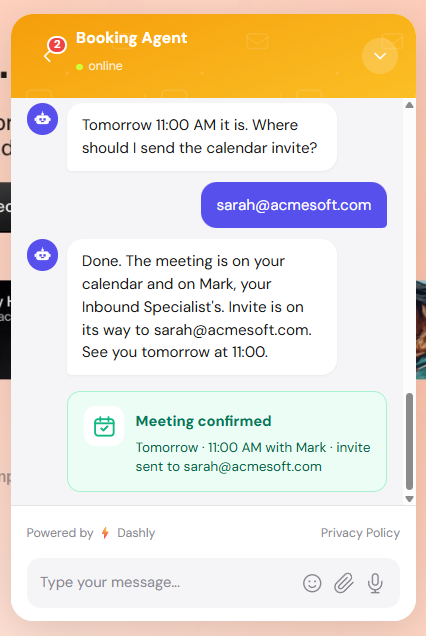
For Dashly, the handoff runs from the AI Support Agent (handling the CS context) to the AI Qualifier Agent (running qualification logic), keeping both conversations native to one platform. The customer experience is continuous; the routing is invisible.
Here’s how an agent qualifies an agent in the conversation:
Step 1: Engagement
Step 2: Qualification
Step 3: Booking
6. Predictive churn detection and proactive outreach
Predictive churn uses behavioral signals to score accounts by risk before a customer files a complaint or starts evaluating alternatives. Acting before a customer has mentally committed to leaving produces higher save rates than any retention play after the decision window closes.
The mechanism: predictive analytics models train on historical churn data and identify the behavioral patterns that preceded cancellation. Common signals for B2B SaaS include declining weekly active users, reduced feature breadth, missed login streaks, and support tickets increasing while resolution satisfaction declines. Accounts above a risk threshold trigger a CS outreach message before any ticket is submitted.
The ROI framing is NRR-focused, not CSAT-focused. Saving one enterprise account at $24,000 ARR pays for most implementations. That reframes the budget conversation entirely when pitched against deflection rate alone.
7. AI-powered IVR replacement in the contact center
Legacy IVR systems force callers through press-1, press-2 trees. Natural language IVR lets callers state their problem in plain language and routes based on spoken intent rather than menu selection.
The mechanism: an NLU model transcribes the caller’s spoken input in real-time, classifies the intent, and routes to the appropriate agent queue or self-service flow. Voice AI models now process spoken language at near-human accuracy for standard queries, making phone-channel self-service viable for query types that previously required a live agent.
B2B SaaS companies with a phone channel report significant CSAT improvements when replacing tree-based IVR with NLU routing, with double-digit point gains common in higher-volume deployments. The primary driver is routing accuracy: customers reach the right team on the first attempt instead of working through 4-level menus.
8. Multilingual support without additional headcount
Multilingual support used to mean hiring native speakers for each language market. AI changes the equation: a single deployment trained natively on multiple languages covers the same ground that previously required a separate team per region.
The distinction that matters is native multilingual NLU versus real-time translation. Translation adds latency and introduces errors on idiomatic phrases. Native multilingual models understand intent in the source language without converting to an intermediate language first. For B2B SaaS expanding into European or LATAM markets, this removes the headcount constraint that typically delays international CS coverage by one to two quarters.
9. Omnichannel context continuity
A customer who starts a conversation on live chat, continues via email, and then calls support should not need to explain their situation three times. Omnichannel context continuity solves this by maintaining a unified interaction record across all channels in real-time.
The mechanism: a shared context store records every customer interaction regardless of channel. When a new interaction opens, the AI surfaces the relevant history before the first response goes out. Resolution time on multi-touch tickets drops because no agent time is spent on context-gathering. CSAT on those tickets typically runs 8 to 12 points higher than on equivalent single-channel interactions.
10. Proactive trigger-based outreach from usage signals
Instead of waiting for a customer to file a ticket, AI can detect that a problem is about to happen and send a message first. This converts reactive support into proactive CS, and it scales to a much larger account base than traditional customer success models allow.
Common triggers for B2B SaaS:
- A user hits a usage limit without opening the upgrade flow
- A critical API integration stops returning successful calls
- A new team member was invited but hasn’t logged in after 48 hours
- A payment fails silently
Each trigger fires a personalized message timed to the customer’s specific behavior, designed to resolve the friction before it becomes a support ticket.
Deflection rate on trigger-based outreach runs higher than reactive deflection because the intervention happens before frustration sets in. Teams running proactive outreach alongside reactive deflection report combined deflection rates of 40 to 55% on the categories they cover.
11. Post-sale success check-ins and upsell triggers
Customer success check-ins don’t scale past 200 accounts per CS manager when done manually. AI takes the monitoring layer: tracking product health scores, flagging accounts approaching expansion thresholds, and triggering check-in messages at the right moment without manual intervention on each account.
The outcome is NRR improvement from expansion captured earlier, and churn reduction from at-risk accounts caught before they leave quietly. For B2B SaaS with annual contracts, catching an at-risk account 90 days before renewal gives the CS team time to intervene. Catching it 14 days before renewal does not.
12. Agentic AI for autonomous end-to-end issue resolution
Agentic AI is the 2026 breakpoint for B2B SaaS customer service: the first architecture where the AI plans, acts, and verifies outcomes without a human at each step. Unlike a chatbot that retrieves an answer and hands off, an agentic AI takes a defined action end-to-end: processing a refund, updating a subscription state, booking a callback, or applying a coupon without a human reviewing each individual step.
The mechanism: the agent receives a request, determines the intent, checks its authorization scope against a defined ruleset, calls the relevant tools (CRM API, billing system, calendar), executes the action, confirms with the customer, and closes the case. The human review layer sits at the authorization boundary, not at every action.
This is what separates 2026 deployments from 2023 chatbot deployments. The earlier generation matched patterns and surfaced responses. The current generation plans, executes tool calls, and verifies outcomes in sequence.
Well-scoped agentic deployments are reaching handling rates that regularly exceed what rule-based chatbots deliver on the ticket categories they cover, with CSAT scores matching or exceeding human resolution scores on the same ticket types. The scope is the guardrail: define it tightly, measure it, expand it incrementally.
What these 12 AI customer service examples have in common
The AI customer service examples that deliver sustainable ROI share five structural properties: native integration with the existing stack, defined automation scope, clear escalation paths with full context transfer, measurement from day one, and an iterative training loop. Teams that skip any one of these consistently hit deflection ceilings the technology alone cannot explain.
Native integration with the existing stack. Every working example connects directly to your CRM, help desk, and knowledge base. Standalone AI tools that don’t read customer context produce generic answers. The integration layer is not optional; it is the mechanism that makes the AI accurate enough to act on.
Defined automation scope. None of the 12 examples runs on “automate everything.” Each covers a specific query category, a trigger condition, or an authorization boundary. Teams that expand scope incrementally after measuring the first deployment consistently report higher long-term deflection rates than teams that deploy broadly at once.
Clear escalation path with full context transfer. Every automated interaction needs a defined exit when it reaches the boundary of what AI should handle alone. The exit must pass the full conversation context to the human agent, not just a flag or a ticket ID. The handoff quality determines how the customer perceives the overall interaction.
Measurement from day one. Deflection rate, CSAT delta, and false-positive escalation rate tell you whether the deployment is working. Teams that don’t instrument these from week one have no signal for iteration. Two weeks of data is typically enough to know whether a deployment needs adjustment or is ready to expand.
Iterative training loop. All 12 examples improve with use. Each escalation is a labeled training example that narrows the gap between what the AI handles and what it passes on. Teams that build a weekly review of escalation patterns into their CS ops cadence see deflection rates compounding over the first six months. Teams that deploy and forget plateau early. For a broader view of how automation compounds over time, customer service automation covers the operational patterns that sustain improvement beyond the initial deployment.
What not to automate: when AI in customer service fails
Every list of AI customer service examples should include the failure cases. The four below are the categories where AI consistently underperforms or actively damages customer relationships when handed to automation without appropriate guardrails.
Complex billing disputes with contractual ambiguity. When a customer disputes a charge that involves interpretation of contract terms, SLA definitions, or historical commitments made outside the help desk, AI produces answers that are technically accurate but contextually wrong. These tickets require a human who can read the contract, review the account history, and exercise judgment that sits outside the knowledge base.
Emotionally charged cancellation conversations. A customer who is cancelling because of a product failure or a support experience that went badly does not want an AI-generated retention offer. Sentiment analysis should flag these conversations for senior CS immediately. The cost of getting this wrong is the public review, the LinkedIn post, and the downstream churn from the people who see it.
Custom enterprise contract questions. Customers on negotiated enterprise contracts often have terms that differ from the standard product documentation. An AI trained on standard KB articles will give wrong answers on those accounts. The fix is a segmented automation scope that excludes enterprise-tier accounts from AI resolution, or a separate KB that accurately reflects the custom terms per account.
First contact after a major service incident. When a product outage affects a significant portion of your customer base, the first contact from affected accounts requires a human-authored response that acknowledges the incident specifically and confirms current status. An AI-generated first response on those tickets, however technically accurate, reads as tone-deaf and accelerates churn risk.
How to pick the right AI customer service example for your team
Choosing where to start with AI in customer service is a function of three variables: ticket volume, query complexity distribution, and the primary metric you’re optimizing for. The combination determines which of the 12 examples above pays back within 90 days. For specific help desk implementations with before-and-after data, automated customer service examples maps these patterns to real platform configurations.
Teams with high volume and low query complexity should start with self-service FAQ deflection (example 2) and first-response automation (example 1). These two cover the high-frequency, low-complexity categories that typically represent 40 to 60% of inbound volume in B2B SaaS.
Teams with moderate volume but high query complexity should start with agent-assist drafting (example 3) and sentiment-based escalation (example 4). These reduce handle time and protect relationships without requiring the AI to operate autonomously on hard cases.
Teams where NRR is the primary metric, not deflection rate, should prioritize predictive churn detection (example 6) and proactive trigger-based outreach (example 10). The revenue impact of one saved enterprise account typically outweighs months of deflection savings on SMB tickets.
For a current view of which platforms support which examples at different price tiers, AI customer support tools covers the platform categories and the evaluation criteria that matter at each volume level.
The single rule that applies across every starting point: scope one ticket category first, not the full queue. Measure deflection rate, CSAT delta, and escalation false-positive rate for two weeks. Expand or adjust based on that data. That sequence works consistently. Deploying everything at once does not.
Conclusion
The 12 examples of AI in customer service covered here range from a same-day configuration (FAQ deflection on an existing knowledge base) to a multi-month deployment (agentic AI for end-to-end resolution). The right starting point depends on your ticket profile, not on the technology available.
What the examples share: they work when scoped correctly, measured from day one, and expanded based on real escalation data. They fail when deployed without clear boundaries, without escalation paths, and without a review cadence that catches the failure modes described above.
Start with your top-50 query types by volume. Map them against the 12 examples. Pick one. Run it for two weeks. The data tells you the rest.
Frequently asked questions
AI in customer service includes: first-response automation and smart ticket routing, self-service FAQ deflection, generative AI response drafting for agent-assist, real-time sentiment analysis and escalation, conversational AI for inbound qualification, predictive churn detection, AI-powered IVR replacement, multilingual support via native NLU, omnichannel context continuity, proactive trigger-based outreach, post-sale success check-ins, and agentic AI for autonomous end-to-end issue resolution. Each example serves a different query type and ROI objective.
Most B2B SaaS companies start with one of two deployments: self-service FAQ deflection for high-volume, low-complexity ticket categories, or agent-assist drafting for complex tickets where fully autonomous resolution is not appropriate. From there, they expand scope incrementally based on deflection rate, CSAT delta, and escalation false-positive rate measured over 30 to 60-day cycles.
Generative AI in customer service most commonly appears as agent-assist: the LLM synthesizes the customer’s ticket history, relevant KB articles, and the current message into a draft response. The human agent reviews, edits, and sends it. Handle time on assisted tickets runs 30 to 50% shorter than unassisted ones, without removing the human judgment layer that sensitive tickets require.
Agentic AI in customer service takes defined actions end-to-end: processing a refund, updating a subscription, booking a callback, or applying a discount within a pre-authorized scope. Unlike a chatbot that retrieves an answer, an agentic system plans, executes tool calls, verifies the outcome, and closes the case without a human reviewing each step. Well-scoped deployments in 2026 are reaching handling rates that regularly exceed what rule-based chatbots deliver on the same ticket categories.
Conversational AI handles multi-turn interactions where the system maintains context across a dialogue and adjusts its response based on what the customer says next. Common examples include inbound qualification flows where CS conversations surface expansion intent, onboarding conversations that guide new users through setup steps, and support conversations that resolve an issue across 5 to 10 message exchanges without handing off. For a full breakdown, see the guide on conversational AI for customer service.
Proactive AI fires outreach before the customer submits a ticket. Examples include: detecting a failed payment and sending a resolution message before the account enters a dunning flow, identifying a user stuck in onboarding and sending a targeted help prompt, or flagging an account with declining usage patterns for a CS check-in before they start evaluating competitors. Teams running proactive outreach alongside reactive deflection report combined deflection rates of 40 to 55% on covered categories.
Salesforce, Zendesk, Intercom, and Freshdesk all ship native AI layers in their support platforms. Salesforce’s Agentforce and Zendesk’s AI suite are the most widely deployed among enterprise B2B SaaS teams. For mid-market and SMB teams that need AI qualification, support, and proactive outreach in one platform rather than bolted onto an existing help desk, Dashly is built for that configuration, combining the AI Support Agent, AI Qualifier Agent, and proactive Engagement Scenarios in one platform.