Agentic AI marketing workflows: 7 types that drive pipeline for B2B teams in 2026
 19 minutes
 22.06.2026
Most B2B marketing teams respond to an inbound lead in hours, not minutes. Agentic AI marketing workflows change that to under 2 minutes, without adding headcount.
The gap between form submission and first human contact is the single largest leak in most B2B pipelines. A qualified lead submits a form at peak intent. By the time someone on your team picks it up, that lead has started evaluating alternatives. The intent window closes in minutes, not hours.
This article covers 7 agentic AI marketing workflows that high-performing B2B teams are running today: from inbound lead qualification and reengagement to competitive intelligence and pipeline attribution. For each workflow, you’ll see the trigger, the agent logic, and the benchmarks teams are reporting. The second half explains how to build your first workflow in five steps, which tool criteria matter for B2B, and the three implementation mistakes that consistently derail otherwise sound projects.
What is an agentic AI marketing workflow?
An agentic AI marketing workflow is a multi-step automated sequence where an AI agent perceives context, reasons through a decision, and executes actions, adapting to new information at each step without manual intervention. Unlike fixed automation sequences, an agentic workflow changes its behavior based on what it observes at runtime, not what was scripted at setup.
The distinction is practical, not just theoretical. It determines what the workflow can handle without human input, which failure modes it encounters, and whether it can operate at the speed inbound pipeline requires.
How agentic AI differs from rule-based marketing automation
Traditional B2B marketing automation works on static decision trees: if someone opens an email, move them to stage B; if they don’t respond after three days, send the next one. The logic is configured upfront and stays fixed regardless of what the lead actually does or says next.
Agentic AI works differently. The agent reads available context: CRM data, firmographics, behavioral signals, conversation history. It reasons about the most appropriate action given that context, then executes. It updates its understanding at each step based on what actually happens, not what was predicted at configuration time.
Here’s what that difference looks like across the dimensions that matter for marketing teams:
| Dimension | Rule-based automation | Agentic AI workflow |
|---|---|---|
| Decision logic | Static if/then rules | Context-aware reasoning per lead |
| Adaptation | None; path fixed at setup | Updates based on new signals |
| Multi-step handling | Every branch must be scripted | Navigates branches autonomously |
| Personalization | Segment-level | Lead-level |
| Human escalation | Configured upfront, uniform | Condition-based per situation |
Rule-based automation treats every lead in a segment identically at every step. An agentic workflow treats each lead as a distinct context with the most likely next action. That difference compounds across thousands of leads per month.
The 4 components every agentic marketing workflow needs
Strip any working agentic workflow to its parts and you’ll find four of them. Remove any one and what you have is automation, not an agentic system.
- Agent — the LLM-powered component that reads context, reasons through the situation, and decides what action to take next
- Tools — the systems the agent can act on: CRM, email, calendar, enrichment APIs, Slack, notification channels
- Memory — the context it carries across steps: lead history, prior conversations, ICP scoring criteria, previous touchpoints
- Orchestrator — the layer that sequences which agents run in what order, passes context between steps, and decides when to escalate to a human
This article focuses on the execution layer: how these four components run together to move leads through the pipeline from first touch to booked meeting.
Why are B2B marketing teams rebuilding their workflows with AI agents?
Three compounding pressures have made agentic AI marketing workflows a structural priority for most B2B teams in 2026: the speed-to-lead gap, resource constraints, and inbound pipeline leakage. Each one represents a structural problem in how marketing execution works today. Fixing any one of them manually creates new bottlenecks elsewhere.
Speed-to-lead gap. The window between form submission and first contact determines whether a lead enters the pipeline at all. Most B2B teams respond in hours. The intent signal is strongest in the first few minutes after submission and decays quickly. Manual processes cannot match that window at any meaningful scale.
Resource constraints. B2B marketing teams now manage more concurrent campaigns and channels than at any point in the past decade, while operations headcount has not scaled proportionally. At that load, manual follow-up on every inbound lead is mathematically impossible to sustain without significant drop-off in coverage. AI agents for marketing operations close this gap without proportional headcount growth.
Inbound pipeline leakage. A significant share of inbound MQLs go cold before reaching an SDR touchpoint. They were qualified in intent when they submitted the form. They were unreachable by the time a human followed up. That is where pipeline generation strategy typically fails: not at the top of the funnel, but in the gap between signal and response.
Dashly teams running the AI Inbound Revenue Agent report 3 to 5 times more pipeline from the same inbound traffic. The agent responds within 90 seconds of form submission, scores the lead against ICP criteria, and books the meeting before the SDR sees the notification.
7 agentic AI marketing workflows for B2B teams in 2026
The seven workflows below cover the full demand generation arc: capturing and qualifying inbound leads, nurturing leads who aren’t ready to buy, creating content that drives discovery, and building attribution that shows what’s actually moving pipeline. Each has a clear trigger, repeatable logic, and a measurable outcome.
1. Inbound lead qualification workflow
The inbound lead qualification workflow is where most B2B teams start with agentic AI, and for good reason. The trigger is clear, the decision logic is consistent, and the outcome is directly measurable: meetings booked within the same session as the form submission.
Trigger: A new lead submits a form or opens a chat conversation on the website.
Agent logic:
- Run data enrichment on the lead profile: company size, industry, role, funding stage, tech stack signals
- Run lead scoring against the qualification criteria configured in the CRM
- If the score meets the qualification threshold, send a personalized response and route to calendar booking
- Log the enriched profile and context summary to the CRM
- Notify the SDR with a pre-built brief: company background, ICP match score, intent signals, conversation summary
What to expect: Response time drops to under 1 minutes. Teams running this workflow report 30 to 40% higher meeting booking rates when AI optimizes outreach timing and messaging, because the agent captures leads during the peak intent window instead of hours later.
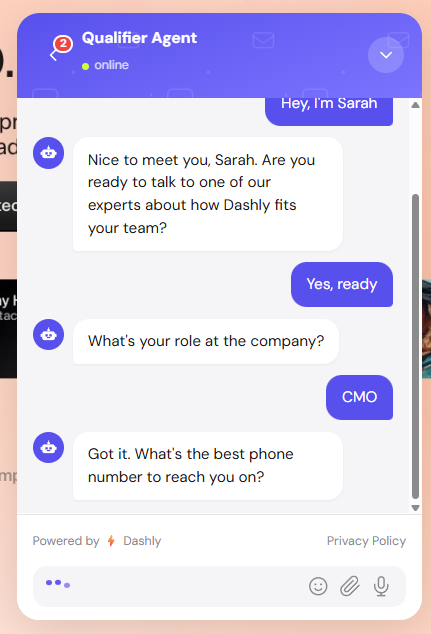
Dashly’s AI qualifier agent runs this workflow natively, responding within seconds of form submission and scoring leads against the criteria you configure. Teams using it consistently report 3 to 5 times more pipeline from the same inbound volume.
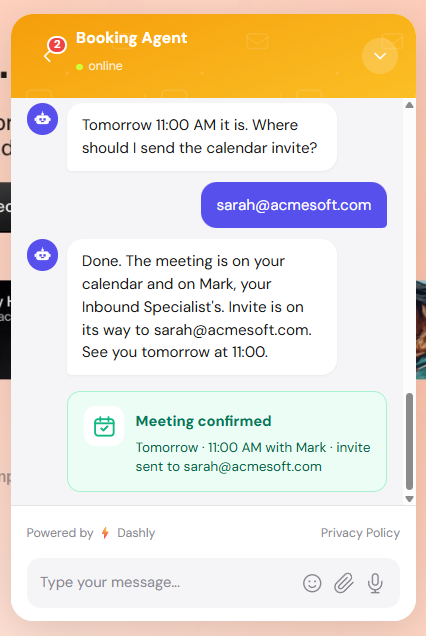
Here’s what the workflow looks like:
Step 1: Engagement
Step 2: Qualification
Step 3: Booking

2. Lead nurturing and reengagement workflow
Most inbound leads are qualified in profile but not ready to buy on first contact. The nurturing and reengagement workflow handles that 60 to 70% of the top-of-funnel by responding to behavioral triggers, detecting re-engagement moments, and adjusting the nurture track in real time rather than pushing every lead through the same static sequence.
Trigger: Lead goes cold after N days without response, or returns to the site after an absence of more than 7 days.
Agent logic:
- Detect the re-engagement signal: page visit, email open, return to the pricing page
- Pull lead history and last interaction context
- Select the appropriate nurture track: educational content, case study, competitive comparison, or direct follow-up
- Personalize the outreach based on the lead’s role, industry, and last known objection or intent signal
- Monitor for replies and escalate to SDR immediately if a response arrives
What to expect: Reactivation rates of 18 to 25% on leads that have gone cold, compared to a 5 to 6% industry average for standard cold outreach sequences. The improvement comes from timing: the agent reaches out when the lead is active, not on a fixed schedule set weeks ago.
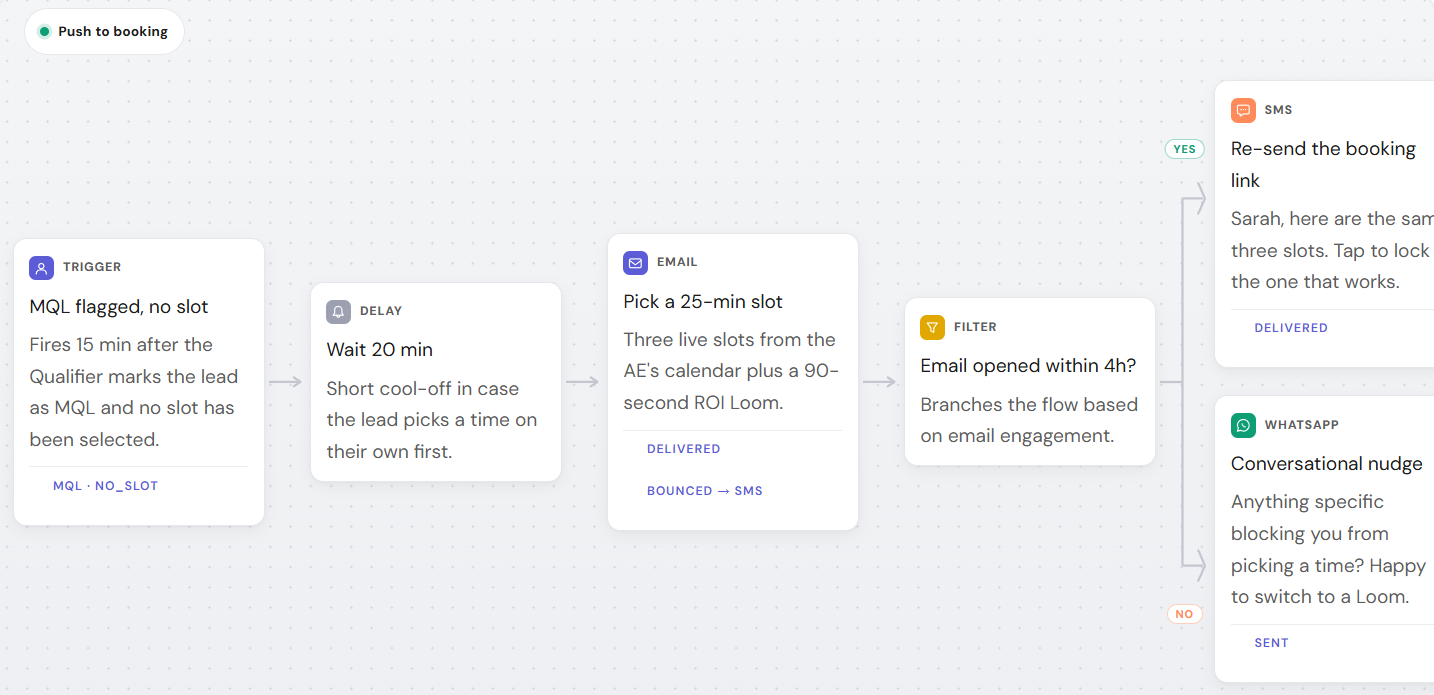
Here’s an example of an AI flow for nurturing to a demo booking:
3. Content research and brief generation workflow
Content briefs take 3 to 4 hours to build manually: researching top-10 SERP competitors, extracting keyword coverage requirements, mapping to audience intent, noting gaps in competitor content. Content marketing automation through agentic workflows reduces that to a 20 to 30 minute review task.
Trigger: Keyword added to the content calendar, or a topic approved in the content planning board.
Agent logic:
- Pull top-10 SERP results for the target keyword
- Analyze competitor articles for structure, coverage gaps, and word count benchmarks
- Extract LSA terms and semantic coverage requirements
- Map requirements to ICP audience intent and primary pain points
- Generate the brief and save to Notion or Google Docs for review
What to expect: Brief creation time drops from 3 to 4 hours to a 20 to 30 minute editing pass. Content teams using this workflow report 2 to 3 times more content output without proportionally scaling headcount.
4. Personalized outbound campaign workflow
Personalized outbound campaign workflows move beyond segment-level targeting by applying campaign personalization at the individual level. The agent pulls audience data, generates message variants, allocates an initial send for A/B testing, and monitors performance, shifting toward winning variants in real time without a human running the analysis.
Trigger: New campaign launch or an audience segment update in the CRM or CDP.
Agent logic:
- Pull segment data from the CDP or CRM
- Generate 3 to 5 message variants mapped to different roles, industries, or intent stages
- Allocate the initial send across variants for A/B testing
- Monitor open rate, CTR, and reply rate in real time
- Shift send volume toward the winning variant and flag underperformers for human review
What to expect: Teams running real-time personalization at this level consistently report 27% higher open rates and 50% higher click-through rates compared to generic broadcast campaigns. The compounding benefit: the agent builds better variant hypotheses over time as it processes more response data from your specific audience.
5. Competitive intelligence workflow
Competitive intelligence in most B2B teams is a weekly manual task: checking competitor sites, G2 reviews, LinkedIn posts, and pricing pages. An agentic competitive intelligence workflow runs that monitoring continuously and delivers a structured digest instead of raw data.
Trigger: Scheduled run (daily or weekly) or a competitor mention alert from a monitoring tool.
Agent logic:
- Monitor competitor pricing pages, product release notes, and G2 or Capterra reviews
- Flag changes: new features announced, pricing updates, positioning shifts
- Scan LinkedIn posts and job listings for signals about team growth or product direction
- Summarize all changes into a structured digest organized by urgency and category
- Distribute to Slack or email, with the most actionable items first
What to expect: Competitive monitoring time drops from 2 to 3 hours per week to a 15-minute digest review. More importantly, coverage improves. A human checking manually catches high-signal updates. The agent catches everything, including low-signal changes that often predict larger positioning shifts before they become visible in traditional monitoring.
6. Meeting booking and sales handoff workflow
The handoff from a qualified lead to a booked meeting is one of the highest-friction points in B2B pipeline. Leads drop off when meeting scheduling requires multiple back-and-forth messages, SDRs are slow to respond, or no automated reminder is sent before the call. An agentic handoff workflow removes each failure point.
Trigger: Lead reaches the qualification score threshold or explicitly requests a demo or call.
Agent logic:
- Check SDR calendar availability
- Propose 3 time slot options calibrated to the lead’s time zone
- Confirm the booking and send a calendar invite with the video conference link
- Generate a pre-meeting brief: company background, open deals, last touchpoints, ICP match score
- Notify the SDR with the brief and log the full interaction to the CRM
What to expect: Dashly nurturing sequences deliver 60 to 90% show-up rates without manual SDR involvement. SDR prep time drops 60% because the pre-meeting brief is generated automatically. Every call starts with context the rep would otherwise have spent 20 minutes pulling together manually.
See the full breakdown of AI SDR tools that support this workflow if you’re evaluating what to add to your handoff layer.
7. Pipeline attribution and reporting workflow
Most B2B marketing teams can confidently attribute 30 to 50% of closed deals to specific campaigns. The rest sits in “influenced” attribution that no one can defend in a pipeline review. An agentic attribution workflow pulls data from every source, maps touchpoints to deal records, and generates an auditable pipeline report on a weekly schedule without manual data-wrangling.
Trigger: End of week, campaign close, or month-end reporting cycle.
Agent logic:
- Pull data from CRM, ad platforms, email tools, and website analytics
- Match touchpoints to deal records using first-touch, last-touch, and time-decay attribution models
- Calculate ROI per channel, campaign, and content piece
- Flag anomalies: high-spend campaigns with low pipeline contribution, content driving traffic but not converting
- Generate a structured report and distribute to stakeholders automatically
What to expect: Revenue operations teams running agentic attribution consistently expand their attributable pipeline. Fewer than 25% of B2B teams rate their marketing measurement practices as fair, meaning most teams are making spend decisions on a partial picture. The improvement comes from correlating signals across systems simultaneously: web visits, email engagement, ad clicks, and CRM stage changes mapped in the same pass, rather than manually reconciling exports from four separate tools.

How to build your first agentic marketing workflow
Building an agentic marketing workflow takes five steps: choose the highest-leverage workflow in your pipeline, map the decision logic in plain language, select an orchestration platform that supports multi-step reasoning, connect two core integrations (CRM and calendar), and define escalation rules before launch. Most B2B teams with an existing stack go live in one to two weeks.
Step 1: Choose the highest-leverage workflow
The right first workflow is where human time is consistently lost, the decision logic is repetitive, and speed has a direct effect on revenue. For most B2B teams, that’s inbound lead qualification: it happens daily, the logic is consistent, and the value of a faster response is measurable in meetings booked.
Diagnostic: list your 5 highest-time marketing tasks and score each on three dimensions: time saved per week, frequency of the task, and revenue impact of doing it faster. The workflow with the highest combined score goes first.
Step 2: Map the decision logic, not the task
Before selecting a platform or agent, write out the logic in plain language. A complete decision map answers four questions: What event triggers this workflow? What context does the agent need to make a decision? What are the possible branches? What conditions trigger escalation to a human?
Template: [Trigger] + [Agent reads X context] + [If condition A, do Y; if condition B, do Z] + [Escalate if X]. This map becomes the workflow configuration. Every field you define here is a parameter you’ll set in the platform.
Step 3: Choose your agents and orchestration layer
Three criteria separate real agentic AI workflow orchestration platforms from relabeled automation: multi-step reasoning (can it navigate decision branches without you scripting every path?), tool-use capability (can it read from and write to your CRM, calendar, and email tools natively?), and memory (does it carry context across the session, or does each step start fresh?).
On orchestration: a single agent handles linear workflows, one trigger, one sequence of actions, one output. Multi-agent orchestration handles workflows that require different expertise at different stages: one agent for enrichment and scoring, a second for outreach personalization, a third for meeting booking and SDR briefing.
Step 4: Connect your martech stack
Start with two integrations: your CRM and your calendar tool. Validate the core workflow logic with those two before adding enrichment, email, or analytics. Every additional integration is another failure point before you’ve proven the workflow works.
Common integrations that add the most value early:
- CRM for lead data and handoff logging
- Calendar tools (Cal.com or Calendly) for meeting booking
- Enrichment providers (Apollo, Clearbit, or Clay) for firmographic scoring
- Email automation for outbound and reply detection
Map your existing marketing tech stack against these categories before selecting the orchestration layer.
Step 5: Set AI guardrails and human-in-the-loop checkpoints
Define escalation conditions before launch. Every team that skips this step discovers why it matters when an agent sends an incorrect message to a high-value prospect.
Hard rules for escalation:
- Any outreach to a C-suite contact at a target account
- Any deal above a defined ARR threshold
- Any lead who expresses frustration or a complaint
- Any situation where the agent’s confidence score falls below a set level
Configure these in the workflow, test them with synthetic edge case events, and run a weekly review of agent decisions for the first four weeks. Adjust scoring criteria and escalation thresholds based on what you observe before scaling.
What to look for in agentic AI marketing workflow tools
Evaluate agentic marketing workflow tools on three criteria: whether the platform supports multi-step reasoning across decision branches, whether it connects natively to your CRM and calendar without a middleware layer, and whether its speed-to-lead response is measured in seconds rather than minutes. A platform that fails on any of these three is automation with a better interface, not an agentic system.
Orchestration depth. Does the tool run multi-step, multi-agent workflows, or does it handle only single-trigger responses? A platform that fires one action per trigger is automation. Ask specifically: does it support agent handoffs? Conditional branching based on live context? Escalation logic you can configure per situation? If the demo only shows a single trigger-action flow, it’s automation, not agentic.
Martech integrations. The best orchestration layer is limited if it can’t connect to your existing stack without a middleware workaround between every tool. Look for native integrations with your CRM, calendar, and enrichment provider. Every workaround layer is a failure point at scale.
Speed-to-lead performance. For inbound pipeline workflows, response time is the primary metric. Measure it in seconds, not minutes. A tool that responds in 8 minutes is faster than a human. A tool that responds in 90 seconds is the difference between a lead who books and a lead who has already moved on.
Dashly’s AI inbound revenue agents runs multi-step qualification and booking, includes native CRM integrations, and delivers a median first-response time under 90 seconds. It is one of the platforms in the full agentic marketing platforms comparison if you’re building a shortlist.
3 mistakes B2B teams make when implementing agentic marketing workflows
The three implementation mistakes that consistently derail agentic marketing workflows: automating a broken process without fixing the underlying decision logic first, skipping human-in-the-loop checkpoints on high-value accounts, and measuring activity volume instead of pipeline outcomes. Each mistake is preventable with one to two hours of planning before launch, and each compounds quickly at scale.
Mistake 1: Automating a broken process. Agentic workflows amplify whatever process they run on. If your ICP criteria are vague, the agent qualifies leads at a vague threshold. If your SDR routing logic has edge cases that humans work around manually, the agent routes incorrectly at those same edge cases. Fix the process first. Write out ICP criteria with measurable thresholds: company size range, industry list, role seniority level. One hour of that work upfront saves weeks of debugging after launch.
Mistake 2: No human-in-the-loop checkpoints. Define escalation conditions before launch, not after the first error. In account-based marketing programs, the cost of one wrong automated outreach is higher than the cost of a week of manual review at that tier. Define your conditions, configure them in the workflow, and test them with synthetic edge cases before going live.
Mistake 3: Measuring activity instead of pipeline. The most common vanity metric trap in agentic marketing: tracking tasks completed or emails sent instead of pipeline outcomes. An agent can execute thousands of tasks per week and generate zero qualified pipeline if the underlying logic is wrong. Measure what the workflow actually affects: meetings booked, MQL-to-SQL conversion rate, and pipeline velocity. If those numbers are not improving after four weeks, the workflow needs adjustment, regardless of how many tasks it is running.
What agentic AI marketing workflows mean for your pipeline
Agentic AI marketing workflows are not a replacement for marketing strategy. They are the execution layer that makes strategy work at a speed and consistency that manual processes cannot match. The teams winning in B2B pipeline in 2026 are closing the gaps that were invisible in a manual process, often without increasing budget or headcount.
The practical starting point is measuring your current speed-to-lead. If first-touch response time is over two minutes, inbound qualification is the first workflow to deploy: it has the clearest decision logic, the fastest measurable result, and the highest ROI. Agentic systems earn their place by handling the decisions that currently get dropped. That is where the pipeline gains come from.
The approach to inbound lead generation does not change with agentic AI. The execution layer around it does. That is where the pipeline gains come from.
An agentic AI marketing workflow is a multi-step automated sequence where an AI agent perceives context, reasons through a decision, and executes actions without manual intervention at each step. Unlike rule-based automation, which follows fixed if/then paths, an agentic workflow adapts based on what it observes at runtime, making different decisions for different leads based on live context instead of predetermined scripts.
Marketing automation executes predetermined sequences: if a lead opens email A, send email B after three days. Agentic AI reasons from context: it reads what this specific lead has done, what company they work at, what their ICP score is, and decides what action makes most sense. The result is lead-level personalization at automation scale, without scripting every possible path in advance.
Inbound lead qualification, lead nurturing and reengagement, content brief generation, personalized campaigns, competitive intelligence, meeting booking and handoff, and pipeline attribution are the seven most common types. See the agentic AI marketing examples guide for each with specific result benchmarks.
Start with one workflow, write out the decision logic in plain language (trigger, context needed, branches, escalation conditions), then connect to your CRM and one other tool. Most teams launch a first workflow in 1 to 2 weeks with an existing martech stack. Do not attempt to integrate the full stack in the first launch.
AI orchestration in marketing is the layer that sequences which agents run in what order, passes context between them, and decides when to escalate to a human. A single agent handles linear workflows. Orchestration becomes necessary when a workflow requires multiple agents: one for enrichment, one for scoring, one for outreach personalization, each passing context to the next.
Yes, and B2B is where the advantages are most pronounced. Deal cycles are longer, lead volumes are manageable, and the value of a single qualified conversation is high. The speed-to-lead gap in B2B is also wider than in consumer contexts, which makes the ROI of closing that gap proportionally larger. See the agentic marketing platforms comparison for B2B-specific options.
For inbound lead qualification with an existing CRM and calendar integration, most teams launch in 1 to 2 weeks. The majority of that time is configuration, testing, and defining escalation rules, not development. Teams without existing integrations typically add 1 to 2 additional weeks for the integration layer.