Live Chat: How Online Chat Tool Can Help Your Business
Drive sales and increase conversion at the very beginning of communication. Let customers write whenever they want — in live chat, messengers, or social networks

Part 1
The ultimate guide to live chat software in 2022

Website live chat lets visitors message your team directly from your site, no email forms, no waiting. You get the conversation in real time; they get an answer in seconds.
Most live chat tools stop at the widget. Dashly goes further: AI Qualifier and AI Support agents work alongside your team, answering questions and qualifying leads the moment someone opens the chat. Even at 2am or over the weekend.
This guide covers how live chat works, its main benefits and features, how the AI Qualifier and AI Support agents fit in, and what to look for when choosing a tool for your website.
Want more guides? Here is the Dashly collection. Learn everything about:
What is live chat software?
A live chat is a widget on your website. Clicking on it, a visitor can get an instant response to any question they have from an agent.
This tool can help optimize the work of sales and support teams. It helps personalize communication with each website visitor and increase customer engagement.
What are the benefits of a live chat?
Convenient tool for you and your customers. According to SuperOffice research, more than half of all customers prefer live chatting on a website. A website chat widget gives them such an opportunity. 73% of businesses mentioned live chat as a support channel with the highest customer satisfaction level.
Revenue increase and sales generation. Via a live chat, you can take a customer through a sale process and increase the Conversion Rate. 50% of customers say having a channel to talk to an agent is crucial for a business.
44% of online customers claim they finished their purchase because a live chat agent answered their queries quickly. So a live chat for an online store is necessary whether you sell a product or provide some service.
Proactive communication. If set up correctly, a live chat guarantees productive communication with your audience. Don’t react to customers’ requests. Increase chat engagement with welcome messages.
What are the main live chat features?
- One inbox to bring together conversations from all channels. It’s crucial to talk with customers where they prefer: emails, social media, messengers, etc. But the more your business grows, the more difficult it gets to keep track of all conversations. A common inbox allows you to maintain constant contact without losing a message.
- Filters, tags, and hotkeys to ease the inbox search and speed up your support service work. Another great feature is notes so your agents could leave comments for their team right in a live chat box.
- Integration with CRM systems to collect and store customers’ data.
- Conversation routing to make sure visitors get help from qualified agents. The automated routing feature speeds up the process and enhances the user experience.
- Triggered welcome chat messages that work when a user performs a certain action.
- Analytics to keep track of your agents’ workload and their performance.
- Chat history and user behavior tracking to know what pages your customers’ visit. It’ll allow you to be in the context of the conversation and help with their queries more effectively.
- Knowledge base and quick replies to answer FAQ faster.
- File sharing (images, video, links).
- Video calls to assist your customer better.
- Chat customization to make a live chat widget match your website appearance. Don’t underestimate the importance of an attractive and convenient interface.
- Mobile app to enable your agents to provide help on the go.
- Agent notifications about new messages.
Live chat vs other support channels
Live chat sits between email and phone in both speed and cost. It resolves questions faster than email while costing less to staff than a phone line, and it leaves a searchable text record a phone call does not. Most B2B teams run live chat alongside other channels rather than instead of them.
| Channel | Typical response time | Cost to run | Best for |
|---|---|---|---|
| Live chat | Seconds to minutes | Low to medium | Real-time questions during active browsing |
| Hours to a day | Low | Detailed requests, attachments, non-urgent follow-up | |
| Phone | Immediate, but queued | High | Complex or sensitive issues that need a human voice |
| Rule-based chatbot | Instant | Low | Simple, repetitive FAQs with no live agent involved |
None of these channels replaces the others.
Most B2B SaaS teams route by intent: a chatbot or AI agent handles the first message, live chat covers real-time follow-up, and phone or a booked call is reserved for the moments that need a human voice. Email remains the fallback for anything that does not need an immediate answer, like an attachment or a long request.
The channel mix matters less than what happens inside each one.
Live chat with AI Qualifier and AI Support agents
Most live chat tools give you a widget and a human inbox. Dashly adds two AI agents that work in parallel with your team from the first message.
AI Qualifier
AI Qualifier engages new visitors first. It asks qualifying questions (company, team size, main pain point), collects the contact details, and either books a meeting directly or routes a hot lead to a rep with a full conversation summary already attached.
AI Support
AI Support answers frequently asked questions pulled from your knowledge base and resolves routine tickets, covering nights, weekends, and different time zones without adding headcount.
When a human agent takes over
Both agents hand off the conversation when a visitor shows high intent (wants a demo, asks about pricing for specific seats, or is ready to start), raises a technically complex question, or expresses frustration. The handoff rules are configurable inside Dashly with no code required.
What your team sees the next morning
Instead of a raw chat transcript, your agent opens a lead card: who wrote, what they wanted, how qualified they are. The AI already collected the contact details and intent signals. The agent focuses on closing, not on repeating the same qualification questions.
How to choose website chat software?
The choice of software depends on the type of your business and the functionality your website requires. While comparing different services, keep these questions in mind. They’ll help you pick the most suitable software.
Can I set up proactive auto messages?
We’ve already mentioned it — chat engagement is crucial for your website. Most customers wait for agents to contact them first and engage them in a conversation.
Why not meet their expectations?
A simple message “Hey, we’re here and ready to help!” lets a customer know that you’re there for them at any step of their purchase process.
Does this live chat work quickly enough?
It’s hard to imagine a worse situation than a chat freezing in the middle of the conversation with a customer. Providing quick and stable service is another crucial aspect of good software.
Ensure a good internet connection and check how much time it takes you to load the live chat.
Is automated chat routing available?
Automated chat routing allows you to keep agents’ workload under control. It guarantees your customers won’t wait till you manually connect them to qualified agents. Usually, live chat services provide a chatbot feature for this.
It alleviates your team’s work and improves customers’ experience on your website. And up to 80% of users mark website experience as important as a company’s product.
Does your live chat have third-party integrations?
Even the most self-sufficient services can’t provide their users with all the features they need. To ensure efficient and convenient communication, you’ll need:
- CRM systems to store relevant information about your customers;
- Zoom integration to arrange audio and video calls if a person needs it;
- Email, Instagram, Twitter, Facebook, WhatsApp, Viber, etc. integration to contact customers in a channel they prefer.
Does a live chat team provide 24/7 support?
Eventually, it all comes down to in-time support. But you don’t only give it, you should also get it.
One of the greatest disadvantages of some live chat services is their inability to consult their users in time. As a result, you have to wait for days and even weeks to get the answer.
And it might cost your customers’ trust.
Check if there are any complaints about the platform support in reviews. Ask a few questions yourself. Make sure you’ll be heard. This is not an exhaustive list of questions you should ask before choosing live chat software. But it will help you avoid some mistakes.
We made a guide on typical mistakes when choosing live chat. You’ll find out how to test a platform you chose.
Which live chat tool should you choose?
The right live chat tool depends on what you need it to do. Here is where to look depending on your use case:
- Comparing chat software for your website in general? See our full breakdown of the best live chat software for your website.
- Focused on customer service specifically? Check the best live chat tools for customer service.
- Using live chat as a sales channel? See the best live chat for sales.
- Running a SaaS business? See the best live chat for SaaS.
- Running an ecommerce store? See the best live chat for ecommerce.
Live chat best practices
We want to share with you some examples of using a live chat to its full potential.
Use a live chat to start proactive communication with your customers
A live chat can start helping you the moment a user enters your website. Set up triggered chat messages to engage visitors in the conversation straightaway. You can set up a short and friendly message to let a customer know you’re here for them:
“Hi, this is Ann! What can I help you with?”
“Hey! If you have any questions, let me know and we’ll figure it out together.”
“Hi, it’s Ann here. Is there anything I could do to help you?”
And if a user responds to the message, they immediately get assigned to a qualified agent. Automated chat routing might come in handy here.
Provide personalized communication with a human face
The time when your professionalism was determined by the company’s restrained and impersonal tone has gone. Modern customers are looking forward to talking to real people with real faces.
A live chat is an opportunity to give your audience what they want. Show your agents’ real faces in chats. Add emojis. Enable images and GIFs sharing. You can also personalize conversations with audio/video calls. Check if the live chat software you chose offers Zoom integration, or provides calls without third-parties involvement.
All these features help establish trustful relationships and gain audience loyalty.
Ask for customers feedback after you finished chatting with them
More than 50% of customers believe that their feedback never reaches someone who can actually act on it. It’s up to you to prove them wrong.
Feedback is essential both for you and your audience. It’s an opportunity for them to be heard. For you, it’s a chance to enhance your customer communication strategy. Pay attention to drawbacks customers point out repeatedly and find a way to solve the issues.
You can set up conversation ratings and feedback forms a customer can fill in after a conversation is over. Show your audience that you care.
Guarantee 24/7 support
Around 70% of customers claim that a short response time drastically improves their experience. But time zones could be quite tricky. How to respond to queries quickly 24/7? There are a few solutions.
Automated replies. They won’t do all the job for you, but they can help retain customers. If a customer texted you during non-working hours, automated replies can gather their contact so your agent could text them in the morning.
Another effective solution is to integrate a chatbot into your live chat. Its functionality is much bigger. You can set it up to:
- respond to customers’ messages while your team is asleep;
- deal with FAQ;
- qualify leads to provide personalized communication in the future.
So while comparing different services, pay attention to those that offer chatbots in addition to a live chat.
Eventually, it doesn’t matter which tools you choose. Just make sure your customers don’t feel left out.
Encourage your clients to finish their purchase
If you struggle with the problem of abandoned carts, a live chat might become your solution.
If a customer didn’t make up their mind yet, an agent stepping into the conversation might play a key part in their decision-making.
Go through the whole purchase process with your customer: answer their questions, offer help when they have doubts. Almost 90% of customers are ready to make a second purchase after their first good customer service experience.
Segment the audience and set triggers
We’ve already talked about the importance of proactive communication. But effective proactive communication also requires careful targeting.
Audience segmentation is crucial because each group of customers has its own pain points. And you have to adapt your communication depending on the pain points.
You can set up triggers for:
- Doubters — people hesitant to buy and waiting for your encouragement and help;
- Customers that came back — who enjoyed your product and services the first time and expect the same attitude;
- Website visitors from certain regions — maybe you have a special offer for them or delivery details need special attention;
- Visitors of the FAQ sections. These people may need your help or a link to an article from your knowledge base.
Reduce your support team workload
Don’t miss out on live chat analytics. It will help you understand the busiest hours and rearrange support team work.
No more queues to one agent, while the others have a break. Engage all your agents in the “hottest” hour to guarantee quick and effective support. Automated chat routing will help you connect customers to free agents even quicker.
We wrote an article on 20 live chat best practices that will help you enhance the work of the tool. Check it out!
How to check your live chat efficiency?
Live chat is a useful tool and is a must for website visitors’ support. But it’s very important to control the figures to make sure you and your team take the best out of the tools you have.
Monitoring your live chat work, keep in mind the following metrics.
Agents’ response speed
In short, the less time it takes your agent to respond, the better.
If it takes you up to 10 seconds to answer the first message in a chat, it’s great. Make sure your first interaction with a customer is at least a bit personalized.
Solution:
Don’t say: “Hello! We got your request. Please, wait.”
Say: “Hi, Mary! Give me a moment to look through our catalogue and pick the best shoes for you!”
And even if an issue takes some time to resolve, your customer shouldn’t think you forgot about them. Automated replies might help you with visitor retention.
You can also use automated replies to provide support during your non-working hours. The replies will let your customers know that no agents are available and collect their contact to respond in the morning.
If you found out that your agents’ response time was too long, try to find the reason first. Maybe their workload is too high, or complex issues take too much time to resolve. Try to find a solution, for example, chat routing.
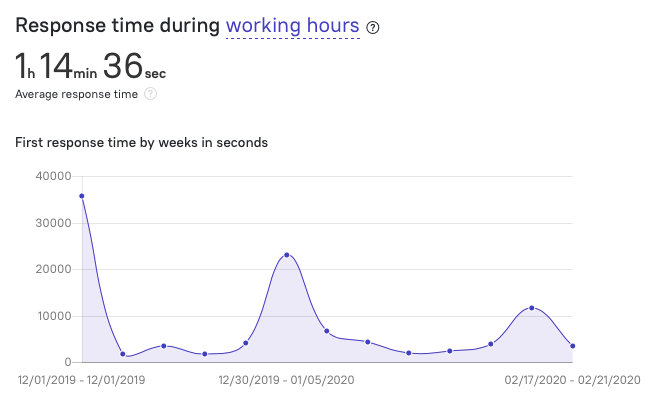
The number of new questions
If users ask a lot of new questions, it might mean they’re interested in your product or services. They want to continue the conversation, so your live chat works well. But if a lot of users ask the same questions, it might mean that some information on your website is unclear or confusing.
Solution: Pay attention to both the number of questions and their nature. Maybe some information or functions need reconsideration.
Check the daily distribution of questions. You may notice that someday, product release day, or just every last Friday of the month, brings more questions. Try to identify the reasons and look for ways to alleviate your support team workload. They might not handle the questions flow well. This will consequently ruin your statistics and even your reputation among your audience.
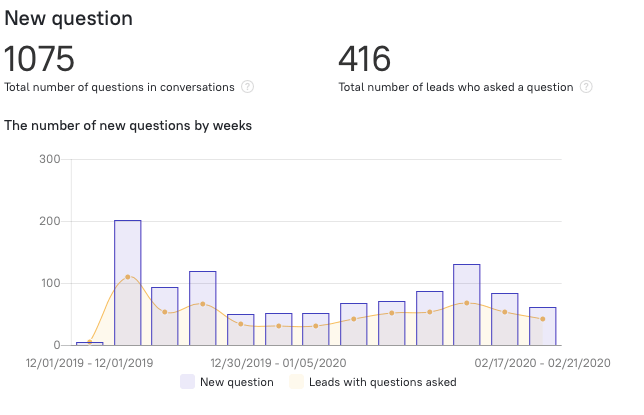
The number of users asking questions
The fewer, the better.
Most of the time, when a user contacts support, they have one particular question. One problem your agent needs to solve. This situation is the best as it’s easy to work with and easy for you to evaluate.
However, one user can ask an unlimited number of questions. Therefore, the number of opened questions will always be bigger than the number of users who ask those questions.
But if you open the statistics and see a clear disbalance: 50 questions from just two users, it requires your attention. Can these users be bots, overloading your support team?
Look throughout the chats and decide whether those requests are really worth the precious time of your agents. There might be real users who need your help now.
The number of issues solved
The more, the better.
This metric is often expressed as a resolution coefficient, the ratio of resolved questions to the overall number of open queries.
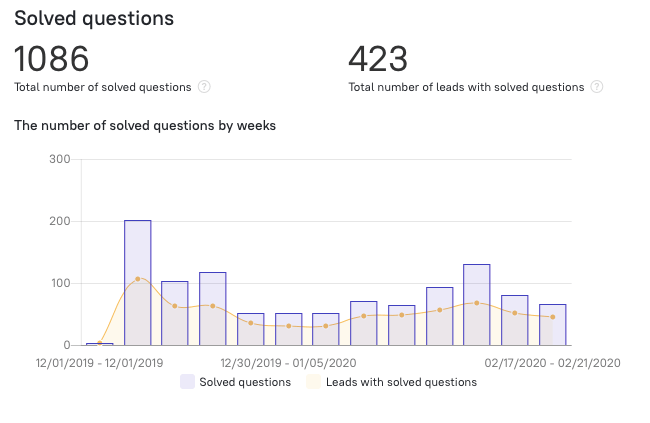
Solution: You can analyze the number of solved issues by day or by week. If the number of open questions is equal to or close to the number of resolved ones, it’s great. But if the gap is too wide, you should find the reason.
If there are too many questions and your support team simply can’t handle the load, you might consider hiring new staff.
If you see repetitive topics in unsolved questions, you could organize extra training on bottlenecks.
The number of users whose questions were resolved
The more, the better.
This metric shows how many people are satisfied with your support team service. This number is extremely important. Up to 90% of customers from all over the world name issue resolution as one of their key concerns.
The number of happy users is often considered concerning the overall number of resolved customer requests. If the metrics are too different, there might be something wrong.
The users might ask too many questions as they work. Or your agents might close the conversation before making sure a customer has no questions left.
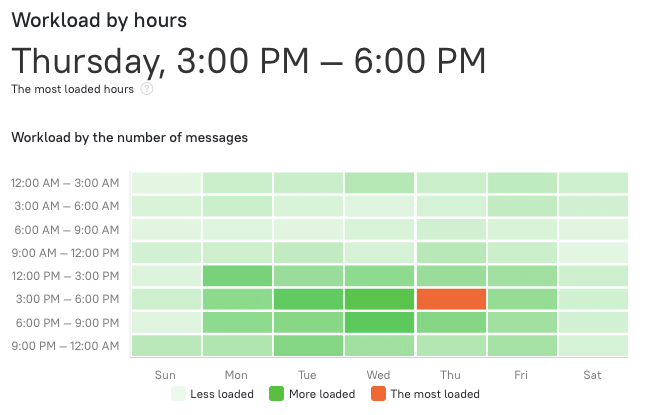
Hourly workload
Track your support teamwork by hours. This will help you find ways to increase their productivity. If you notice a high flow of questions at a certain hour, change the operating mode and maximize the team’s efforts at this particular hour.
Our main advice here: always distribute the workload on the “hottest” hours.
Agents statistics
In addition to overall statistics, it’s important to keep track of each team member’s performance.
You should pay attention to
- The agent’s response speed;
- Issues resolved by the agents;
- Issues the agent is involved in;
- The agent’s average score shows users’ rating of conversations with the agent.
We highly recommend you evaluate your live chat efficiency regularly. To help you with it, we brought together all the key live chat metrics you should keep in mind.
So is there the best live chat software?
In short, no. There’s no universal live chat software whose services solve all your problems and suits any type of business.
The choice will depend on the tasks you want a live chat widget to take. And it’s not all. Proper setup and regular checkups of key metrics are also crucial to using your live chat to its full potential.
If you’re not sure which solution to choose, sign up for a consultation with our expert. 👇

FAQ
A live chat is a widget you set up on all or particular pages of your website. It is one of the main tools for customer communication: if a visitor has a question, they can get an answer right there instead of emailing support. Beyond support, live chat also helps with customer engagement and lead qualification.
Most live chat platforms give you a snippet of code to add to your website. The installation itself takes minutes and rarely needs a developer. See our best live chat software overview to compare platforms before you install one.
Keep onboarding short and practical: cover the basics, then move to real cases quickly. Give new agents access to your knowledge base, pair them with a real customer query early, and let them shadow a full conversation before handling one solo. See our guide on how to train live chat agents for a full walkthrough.
A live chat widget adds some weight to a page, so it can add a small amount of load time. Since page speed is a ranking factor, a poorly optimized widget can have a measurable effect. Read more on how live chat influences page ranking and load speed.
Live chat is the channel: a widget that connects a visitor to your team in real time. In Dashly, two AI agents work inside that channel. AI Qualifier engages and qualifies new visitors, and AI Support answers routine questions from your knowledge base. Both hand off to a human the moment a lead shows high intent or asks a complex question.
Yes. Live chat captures leads at the moment of highest intent, when a visitor is already on your site with a question. With AI Qualifier running qualification automatically, you collect contact details and intent signals even outside business hours, so fewer leads are lost to slow response times.
No. Live chat connects a visitor to a person, or in Dashly’s case to an AI agent, in real time through a chat widget. A chatbot is a separate rule-based or AI-driven bot that can run with or without live chat. Dashly combines both: a live chat widget with AI Qualifier and AI Support agents built in.







![Customer service automation: complete guide for SaaS teams [2026]](https://www.dashly.io/blog/wp-content/uploads/2025/05/cusotmer-automation-guide-720x317.png)