Chatbot Guide: Create chatbots to assist your customers 24/7
Learn the best tips, tools, and strategies on how to assist customers, collect leads, and deliver the hottest of them to sales 24/7 with chatbots
Part 1
Ultimate Guide to Chatbots in 2022
Part 2

TL; DR: AI chatbots for business handle customer queries, qualify leads, and book meetings 24/7 without adding headcount. For B2B SaaS teams, the highest-ROI use cases are inbound lead qualification, demo booking automation, and 24/7 FAQ handling. The best tools in 2026 go beyond scripted flows: they use large language models to hold contextual conversations, route hot leads to sales, and push data into your CRM automatically.
This guide covers: what AI chatbots for business are and how they work; the 10 best chatbot tools for B2B teams in 2026; how to choose the right one for your use case; and how AI agents differ from traditional rule-based bots.
Last updated: June 2026.
Want more guides? Here is the Dashly collection:
What is a chat bot, and how does it work
A chatbot is a software that simulates human-like messaging with customers in a chat. It can be used on website, app, messenger, etc. Picture it as a receptionist in a hotel. It greets newcomers as well as current users and helps them get settled.
You can set up a chat bot to save time with FAQs, lead qualification, and a number of other basic tasks. Imagine how much resources you can save by automating these processes.
There are two types of chatbots:
- Rule-based chatbots operate based on preconfigured scenarios. These chatbots have a set of questions and answers that help learn more about users problem.
Rule-based chatbots don’t understand the context of the conversation. So, if a customer asks questions with words not included in the chatbot’s script, it will route the conversation to an agent. This type of chat bot is easy to set up, and they’re quite cheap compared to its counterparts. These two factors make them so popular. - AI chatbots have more freedom in their communication. Just like rule-based chatbots, they need some preconfigured questions and answers to start. But further interaction is based on machine learning — an AI chat bot adjusts to customer’s messaging. Besides, it learns from the previous conversation. So you don’t need to update it manually all the time.
What is a bot, and what can it do to help my business? Find answers to these questions in our article.
What are the benefits of chatbots?
With your business growing, it’s hard to keep things under control, isn’t it? Long time waiting for an agent to resolve users issue. Emails with special offers, lie unread in spam. More and more visitors, leaving your website unqualified. All these issues can be resolved with a chatbot.
👉 Increase customer experience level by reducing Response Time. It can be hard to provide instant support with limited human resources. So, set up a chat bot to deal with users FAQ fast.
As a result, your agents have more time for dealing with really hot or difficult users requests.
👉 Boost sales by dealing with all the questions in advance. Set up a chat bot to answer questions about pricing. Trust it with a bit of advertising too! Let your chat bot tell visitors about your advantages over competitors.
Well-set chat bot can bring you +31% sales growth. It can decrease the hesitation before the purchase by dealing with customers’ major worries and questions.
👉 Improve lead generation by launching an email capture chatbot.
👉 Have you heard about banner blindness? Chatbots can help you avoid it.
Chatbots handle almost 70% of conversations from start to finish. It means they can engage the audience. And they do it pretty well! Thus, chatbots might be way more successful in lead capturing than lead forms.
AI chatbots vs AI agents: what is the difference
Not all chatbots are equal, and the terminology has shifted significantly in 2025-2026. Understanding the difference helps you choose the right tool for your business goal.
Traditional chatbots — scripted and rule-based
Traditional chatbots follow fixed decision trees. They answer FAQ questions, route visitors to the right page, and collect basic contact information. They are reliable for simple, predictable interactions but break down when a visitor goes off-script. Examples: ManyChat, basic Intercom bots.
AI chatbots — LLM-powered conversation
AI chatbots use large language models to understand natural language and hold contextual conversations. They can handle complex questions, remember context across multiple messages, and adapt their responses to what the visitor says. Examples: ChatGPT-based bots, Tidio AI.
AI agents — autonomous action-takers
AI agents do not just answer — they act. They book meetings into your calendar, update your CRM, send follow-up emails, and route qualified leads to sales, all without human input. For B2B SaaS teams, this is where the highest ROI sits. Dashly’s AI Qualifier Agent and AI SDR Agent operate at this level: they engage every inbound lead, qualify them with natural-language questions, and take action on the outcome automatically.
| Traditional chatbot | AI chatbot | AI agent | |
|---|---|---|---|
| Understands natural language | No | Yes | Yes |
| Takes actions (books, sends, updates CRM) | No | No | Yes |
| Handles complex conversations | No | Yes | Yes |
| Best for | Simple FAQ | Support deflection | Lead qualification, demo booking |
| Setup complexity | Low | Medium | Medium |
AI chatbot trends for business in 2026
Marketing automation stimulates chatbot implementation in various industries. It already handles simple users questions very well. But in the future, chatbots will learn to identify customer tone and intent.
With the help of sentiment analysis, chatbots will be able to tell apart positive and negative messages and even understand sarcasm in chat on your website, messenger, socials.
But these are trends of the more distant future.
As for 2022, experts predict chatbots to do users segmentation and even individualization based on extensive customer data. In short, one conversation with a chatbot will never be like the other, because one customer is never like the other.
Despite the rapid development of chatbots future trends, experts don’t believe they will replace human agents completely. They’re more likely to complement each other to provide a better customer experience.
Another growing trend is “focus on conversation”! Right now, you can’t predict what words your customers will use, so you can’t prepare your chatbot for everything. But you have a massive base of actual users conversations that is constantly growing.
So experts assume in a short time chatbot development will be based on its experience with customers. Don’t hesitate to learn from your users!
Chatbots use cases
Chatbot is a multifunctional tool that will be helpful for your support, marketing, and sales teams. Now let’s delve into its use for each of them.
Customer support
The bigger your business grows, the busier your support team gets! Chatbot can help handle an overwhelming number of customers questions.
First, you can delegate basic tasks to a chatbot. Without human involvement, it can:
- help visitors with website navigation;
- deal with users FAQs;
- share articles from your knowledge base, so customers could find answers to their questions themselves.
Chatbot can reduce your response time significantly. Your customers won’t have to wait a long time anymore on socials, messenger, or on your website live chat. Chatbot replies within seconds. Besides, it can deal with queries 24/7, even when your team is asleep.
One more cool feature of a chatbot is conversation routing. When website visitors write to a chat, chatbot finds out details about the issue. If it’s easy to solve, it won’t even get to people!
If the problem is more complex, a chatbot will assign the conversation to a qualified agent.
We have an article on the best customer service chatbots, check it out!
Marketing
Chatbot can also level up your marketing teamwork. Set it up to capture leads, and you’ll collect new users contacts in your database even during non-working hours. Chatbots proved to be more effective in it than lead forms we all got used to.
With a chatbot, you’ll increase overall customers experience on the website, messenger, socials. Set it up to greet new visitors, and recommend relevant products to those who used your service before.
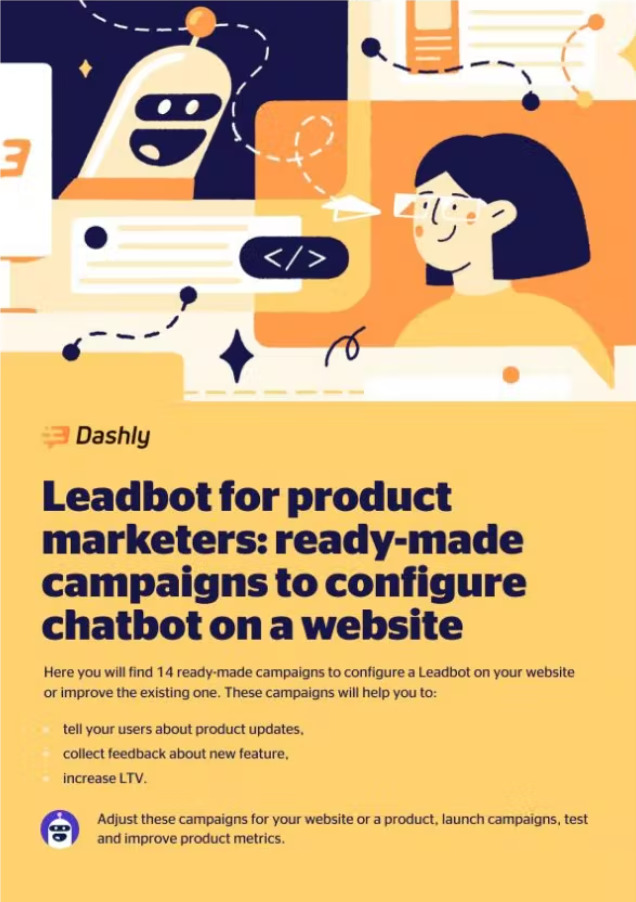
To help you set up a chatbot for lead generation, Dashly prepared a playbook for product marketers. You can get it here 👇
Sales
Chatbot will save your sales team time by answering repetitive questions about your product. This way, your agents will have more time to focus on more complex tasks.
Save your sales reps hours of “homework” when they explore each user in detail to provide the best service. Chatbot can do the pre-qualification on its own. It will:
- find out prospects’ needs and what they look for;
- gather potential users contact data;
- send the data to the right agents.
Chatbot can boost the efficiency of all your teams and bring your customers experience to another level! Just divide tasks between your human agents and chatbots wisely.
To help you with setup, Dashly created ready-to-use campaigns to facilitate your teams’ work.
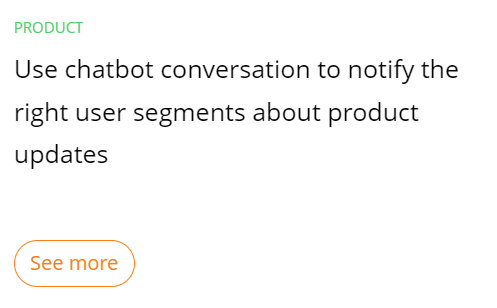
How different types of businesses can use chatbots
With a wide range of tasks, it can perform, a chatbot comes in handy for different kinds of businesses. First, let’s overview how it can help in eCommerce.
Chatbots for eCommerce
- Since a chatbot can perform simple tasks, you can set it up to greet new website visitors in a chat, messenger, or socials.
- It can also send special offers or ask whether a customer needs help with some questions.
- A chatbot can serve as a virtual assistant too. A customer can turn to it to specify delivery details. This will save your agents’ time and alleviate their workload.
- Besides, you can set it up to capture leads. A chatbot can offer a discount or a free delivery in exchange for an email or another contact. After that, you use this contact for further nurturing and convert more visitors into buyers.
It’s not all! Dashly team created a map of 13 chat bot campaigns that can help your eCommerce business.
Chatbots for SaaS
In SaaS companies communication with users, chatbots are more useful for the support team.
- Just like in eCommerce, it provides proactive communication with customers and helps them if they need any help on your website, messenger, or socials.
- You can also set up a customer onboarding campaign. Chatbot sends a couple of messages to users, showing them the main solutions and how to configure them. This way, a customer will know all basic data without extra actions.
- A chatbot can collect users feedback for you. It gives you an opportunity to enhance new solutions and the customer experience in general. The majority of customers prefer to give their ratings or comments in a live chat, messenger, socials conversation, rather than click a link to a survey.
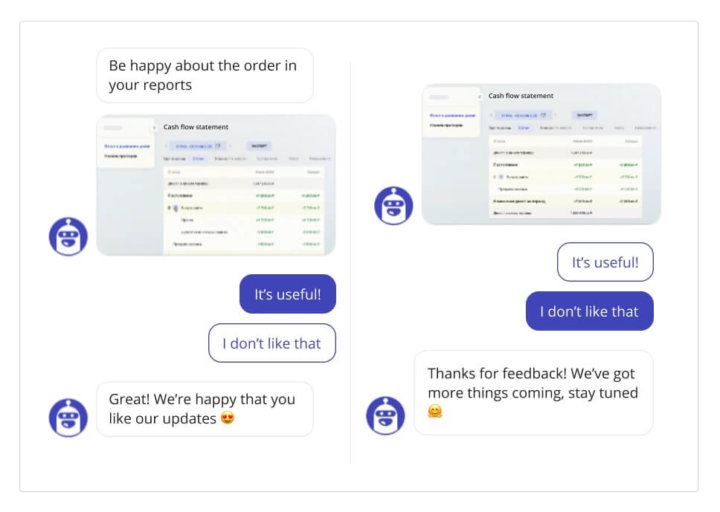
Chatbot can also book demos for customers, capture and qualify leads, and then segment them. We made 16 chatbot campaigns to boost your SaaS team’s development.
Chatbots for EdTech
- Chatbot capture and qualify leads 24/7 without your agents’ involvement. Visitors’ segmentation allows a chatbot to personalize its messaging with users.
- Collect customers feedback to enhance your work in the future.
- Close more deals by collecting additional customers data and providing your sales team with it.
- Facilitate your support teamwork by dealing with users FAQs and other basic tasks.
- Provide a personal approach and pick the best matching features for each segment of your audience.
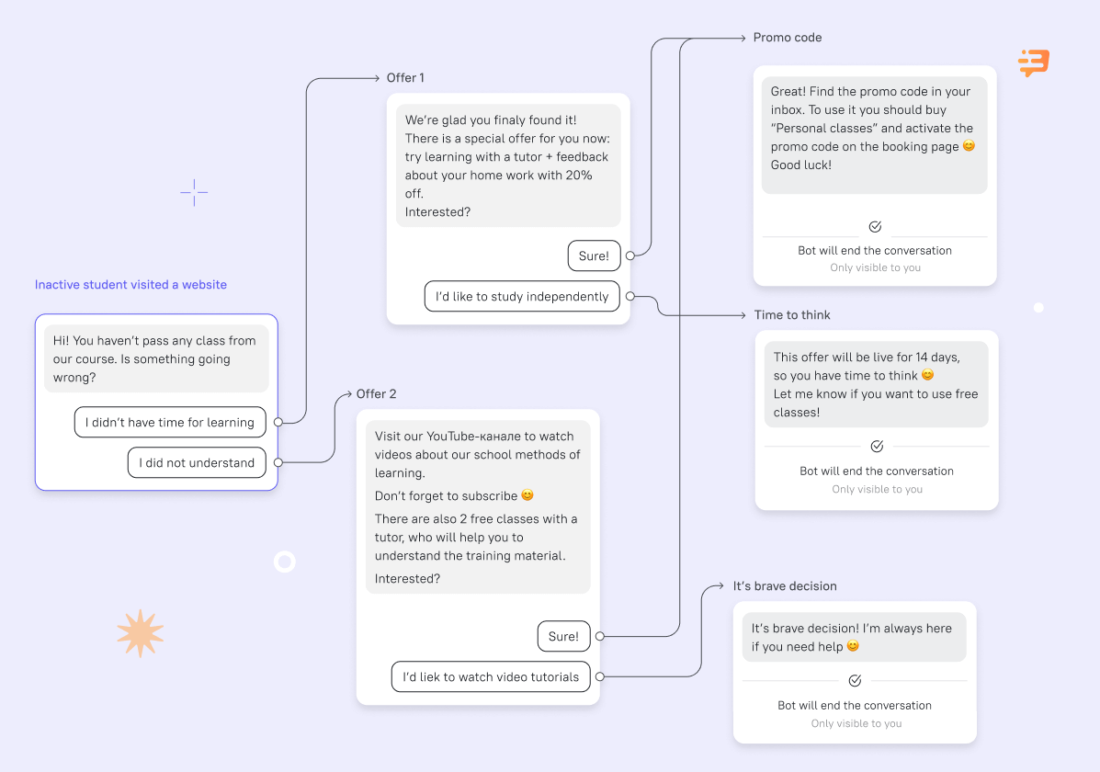
If you’ve never used a chatbot before, Dashly prepared 8 ready-made campaigns for online school chatbots.

How to create a chatbot
There are two main ways to configure a chatbot. You can create it from scratch or use a service with a convenient builder. Let’s consider both options.
Hand-coding your own chatbot requires a team of developers or some other service.
On the one hand, you get full control over your chatbot’s functionality. And you don’t depend on the platform’s limitations.
On the other hand, building a chatbot from scratch is a time-consuming process. Testing and mistakes correction may take a lot of time. So is it worth it? The decision is up to you!
Use a service to set up a chatbot on your website, messenger, socials. Platform builders are way easier to figure out, even if you have no experience with such software. Most of them have a simple drag-and-drop builder and offer ready-to-use templates.
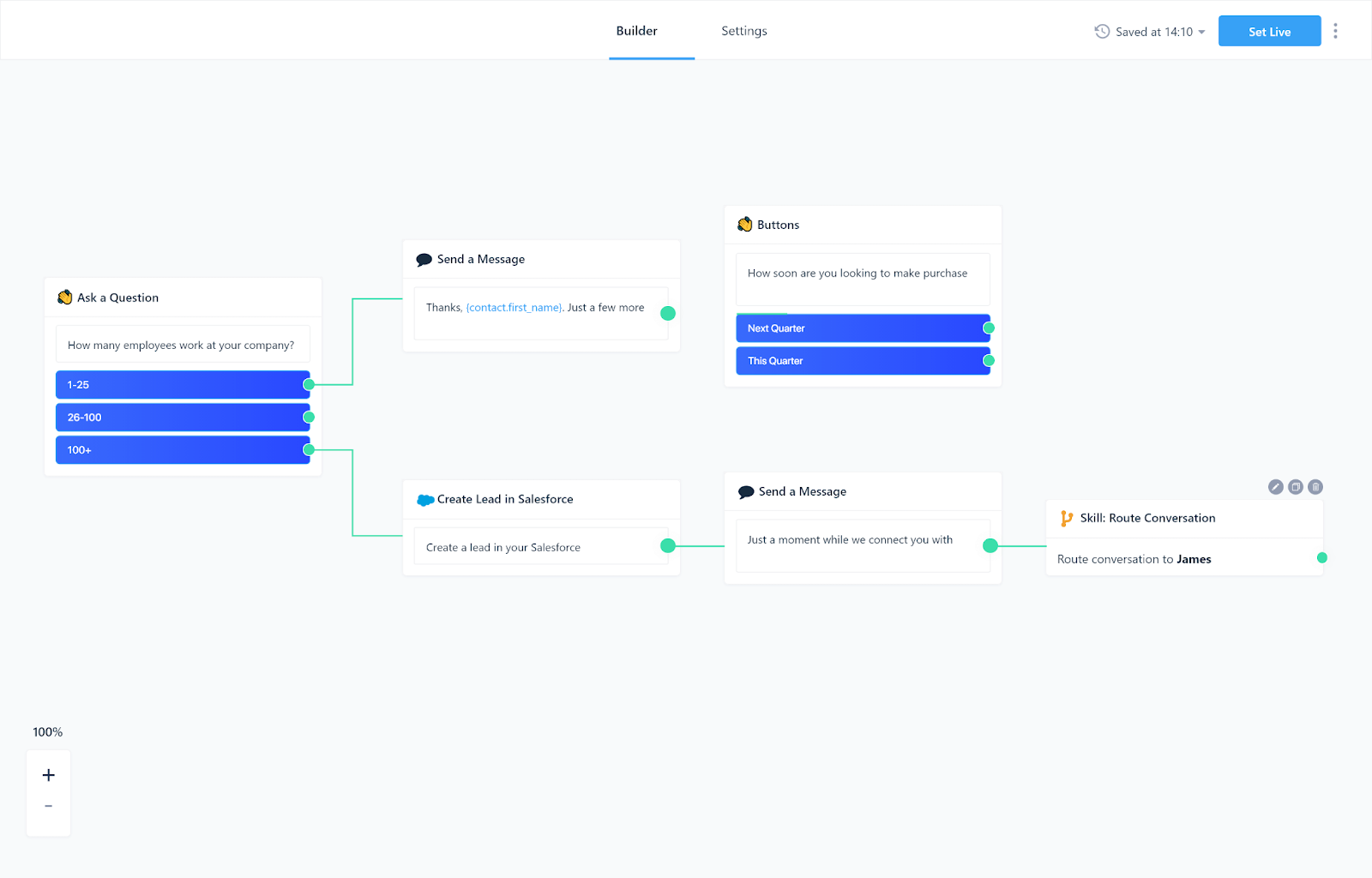
That’s what Dashly chatbot builder looks like:
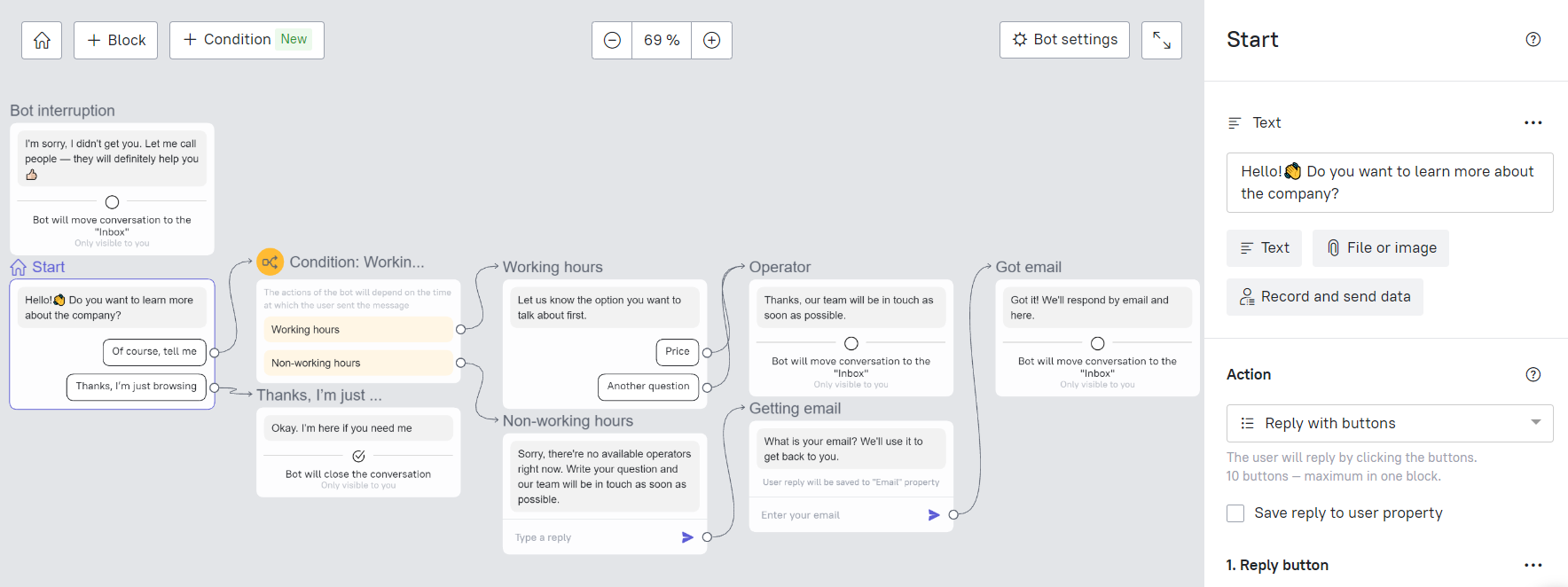
You write the messages, then configure response buttons. In addition, you can see a chat from customer’s perspective in the interactive preview.
Of course, you’ll be limited by the service functionality. But using a service is a good way to find out how a chatbot can support your business. Besides, it’s easy and doesn’t take any special skills.
Read our article on how to create a bot in 15 minutes!

Best chatbot software
So let’s talk about options variety in more detail. We picked five services that offer chatbot software. Their functionality varies a bit, and so does their pricing. So, here you’ll find solutions for businesses of different sizes and budgets.
Here is a quick comparison of the five tools before we go into detail on each:
| Tool | Best for | Starting price | Free trial | AI-powered |
|---|---|---|---|---|
| Dashly | B2B SaaS inbound qualification + AI agents | Custom pricing | 7 days | Yes — AI Qualifier + SDR Agents |
| Intercom | Enterprise support and sales | From $39/mo | Yes | Yes |
| Drift | Enterprise conversational marketing | Custom | No | Yes |
| LiveChat + ChatBot | SMB customer support | From $24/mo | 14 days | Yes |
| Gist | SMB all-in-one | From $29/mo | Yes | Limited |
Dashly — AI inbound revenue agents for B2B SaaS
Dashly is a team of AI inbound revenue agents for B2B SaaS that qualifies leads, books demos, and follows up with prospects 24/7 — without adding sales headcount. The AI Qualifier Agent engages every website visitor, asks qualifying questions in natural language, scores intent, and routes hot leads directly to sales. The AI SDR Agent handles follow-up automatically, placing calendar slots in front of leads who showed intent but did not convert.
- AI Qualifier Agent — qualifies inbound leads from your website 24/7, routes high-intent visitors to sales, no manual work needed
- AI SDR Agent — follows up with leads automatically, sends personalised sequences, and books demos into your calendar
- Pop-up and trigger campaigns — behaviour-based targeting to engage visitors at the right moment
- Live chat — real-time conversations for visitors who need a human touch before signing up
- Triggered email campaigns — automated sequences triggered by visitor behaviour
- 30+ CRM, messenger, and social media integrations — pushes qualified leads to HubSpot, Pipedrive, and Salesforce automatically
Pricing: custom pricing. Free trial: 7 days. See the pricing page for details.
- AI Qualifier and SDR Agents qualify and route leads 24/7 — no SDR time wasted on non-target prospects.
- Unlimited agent seats — whole team in one dashboard at no extra cost.
- Visual builders for chatbots, pop-ups, and email flows — no developer required.
- 30+ integrations with CRM, messengers, and social media.
- Best suited for B2B SaaS and Real Estate — less relevant for pure e-commerce (per G2 reviews).
- Complex multi-step scenarios take a few hours to configure (per user reviews).
Intercom
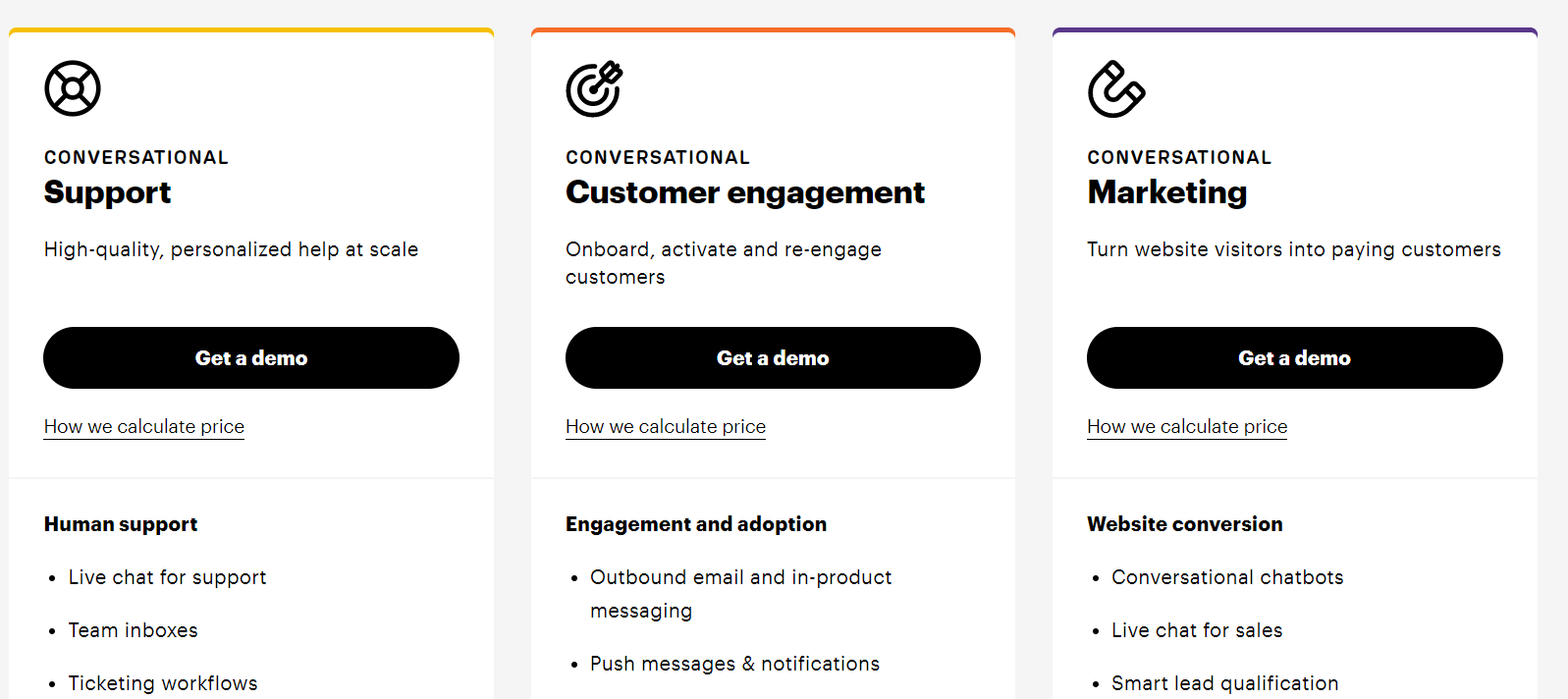
Intercom helps businesses provide an excellent omnichannel experience for their audience. It’s perfect for enterprises. But Intercom offers limited plans for small businesses too.
Within a big toolset, Intercom customers get a chatbot. It can:
- engage website visitors in the conversation;
- qualify leads;
- share articles from a knowledge base;
- notify customers of updates;
- deal with frequently asked questions and other customers’ queries;
- schedule video calls.
To empower a chatbot, Intercom offers solutions:
– live chat;
– triggered messages;
– email campaigns;
– customer base management;
– conversation routing;
– knowledge base;
– A/B testing;
– segmentation and personalization;
– push notifications
– integrations with CRM, messenger, socials, etc.
Pricing: from $67/user per month to $999
Chatbot is available with an additional module for plans above $99. If you choose a plan with automation features that costs $499 or $999, you get access to custom chatbots for customers engagement.
A chatbot for customers questions and integrations goes only with advanced lead qualification (from $499) and support automation modules (from $249).
If you’re a startup, Intercom offers you a special plan that starts from $67 per month. But you have to match its startup criteria:
- certain agent count requirement;
- investment level;
- being a new Intercom customer.
Intercom gives its customers 14 days to test the service functionality. But you’ll have to provide your credit card details for it.
Drift
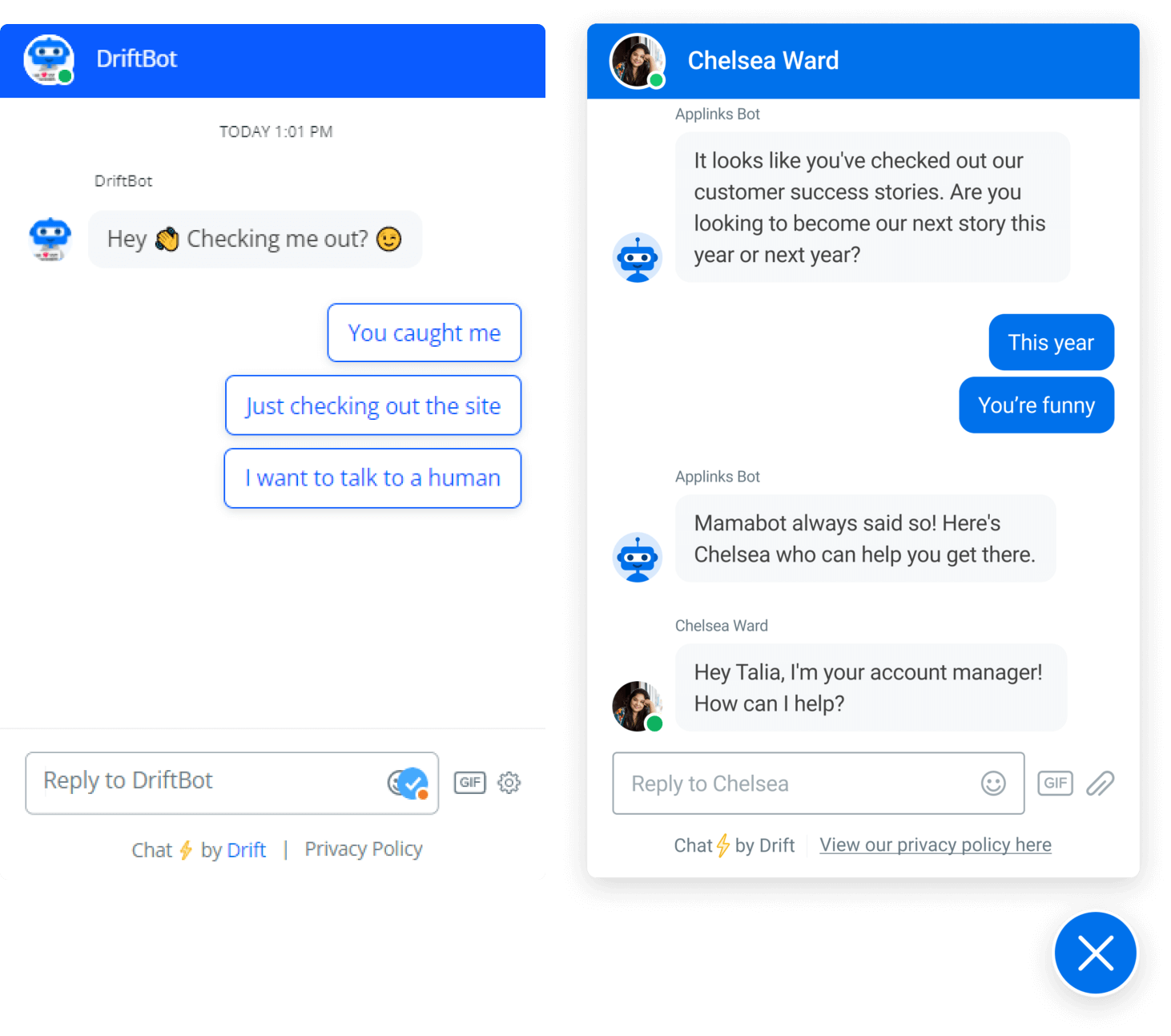
Drift is a digital service that mostly aims to facilitate the work of the sales team. For this, they offer a chatbot. It will support your agents operations aimed to increase users engagement and lead qualification. So later you could convert more visitors into buyers.
Drift’s chatbot can:
- engage website visitors in the conversation by offering them help;
- qualify leads;
- deal with FAQs with help of a knowledge base;
- fill in lead cards with users’ responses;
- book demos for available time slots.
Remember that you’ll have to train your chatbot with the Drift’s team beforehand.
In addition to a chatbot, you can get:
- live chat;
- email campaigns;
- video calls;
- automation (including bots)
- integration with your CRM, messenger, socials.
Price: from $0 to $1500 per month
Drift offers its customers four plans. It has a free plan for small businesses. Premium, Advanced, and Enterprise plans are for medium and large companies. But you’ll find out the price for your business only after a one-to-one chat with an agent.
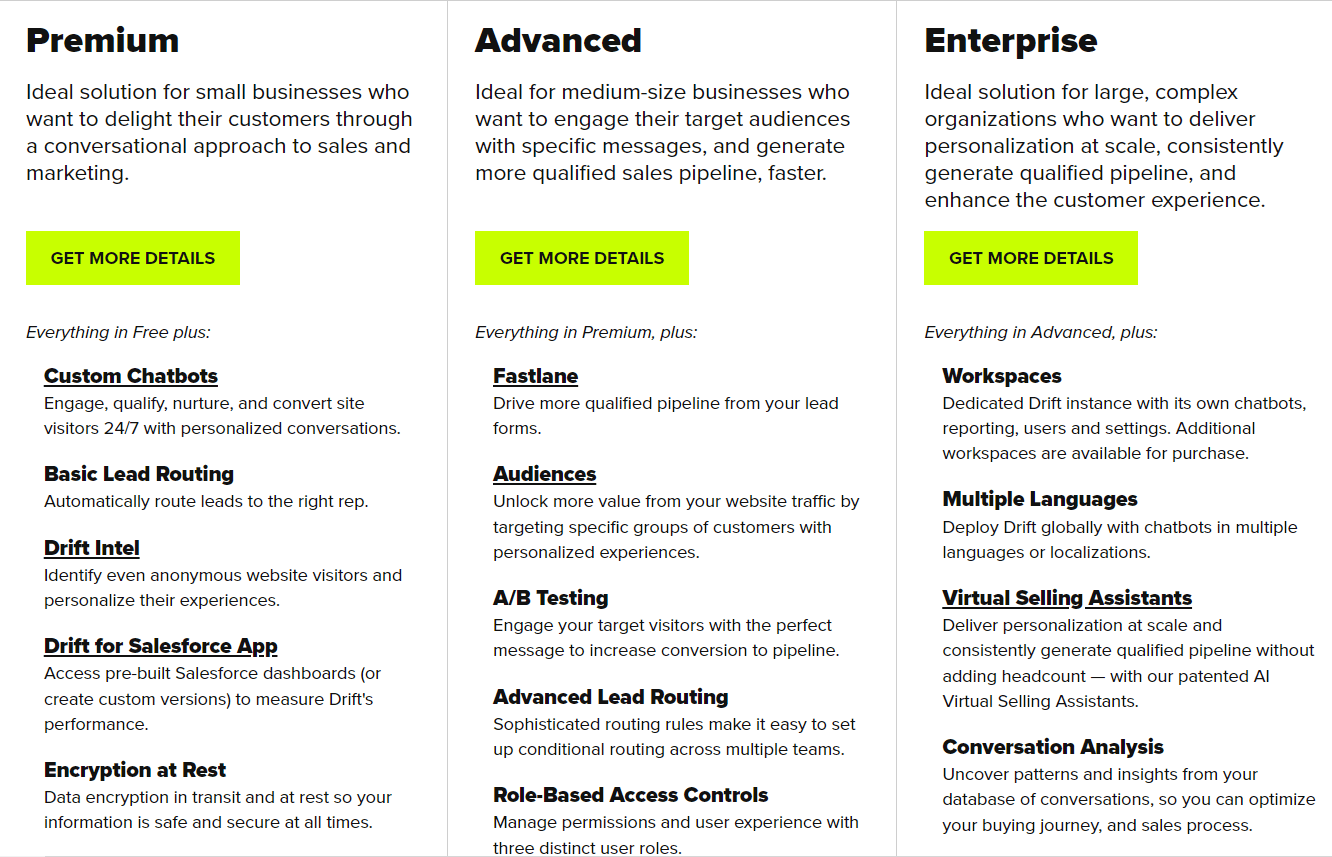
We did some research to learn more about Drift price.
- With a free plan, you get a live chat, welcome email messages, email signatures, and basic reporting. You also get a number of integrations: Slack, Vidyard, Google Analytics, and calendar. You have a 100 contacts limit and only one agent seat.
- With the Premium plan, you get a chatbot, live chat, proactive messages, canned responses, revenue reports, etc. Premium costs from $400 to $1,500 per month/agent (thank you, Melissa Pardo-Bunte). If you want more agent seats, you’ll have to pay an extra $80 per month.
- To get access to role-based access management, A/B testing, and multilingual chatbots for multiple brands, you’ll have to upgrade your plan to Advanced or even Enterprise. They cost $4800 per year.
Drift offers no trial period, but you can test the service on a free plan.
LiveChat+ChatBot
One business developed two full-fledged products — a live chat and a chatbot. But here we’ll focus on ChatBot.
This service is affordable for businesses of any size in any industry. This chatbot can:
- qualify leads;
- deal with basic customers queries;
- answer more complex users’ questions after some training;
- route conversations to the right agents;
- share images;
- send messages to particular segments of your audience;
- engage your audience in the conversation not only on the website but on Facebook messenger and in socials too.
To empower a chatbot, you can start using LiveChat. With it, you’ll get access to:
- tickets system;
- live chat analytics;
- various integrations with email platforms, Facebook, Slack, CMS systems, etc.
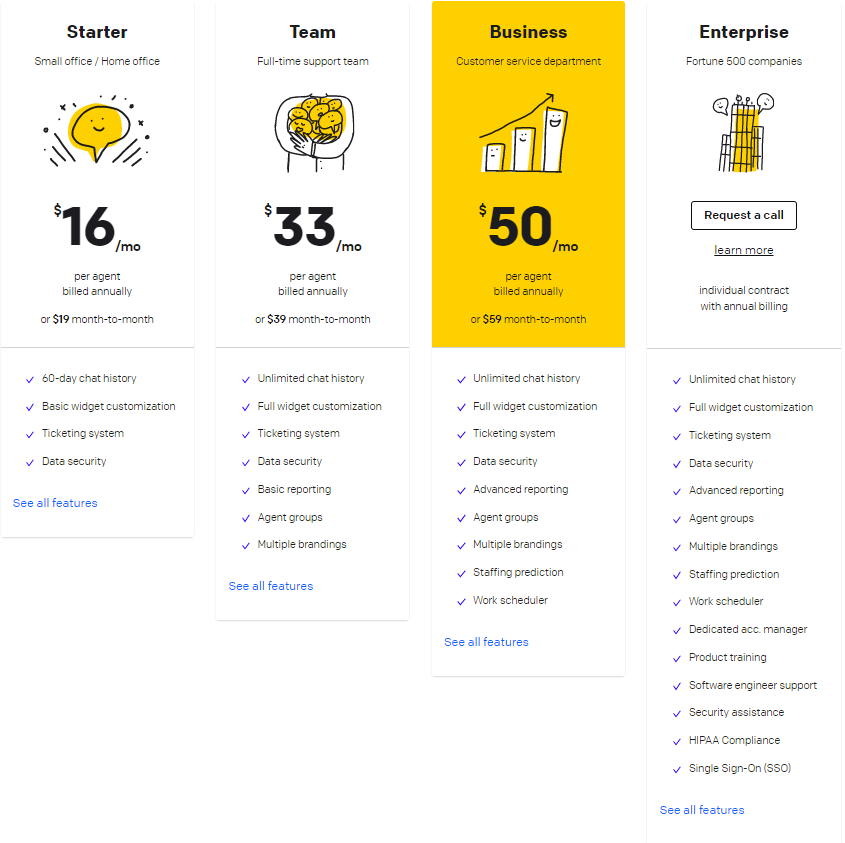
Price: from $19 to $59+ per month
The price for the software will depend on the number of agents in the chat and conversations. ChatBot is like an additional integration of LiveChat. The starting price for LiveChat is $19 per month, but chatbot configuration starts at $50.
You’ll get 14 days to test the chatbot for free.
Gist
Gist is a service that helps businesses set up omnichannel communication with their audience. It suits any kind of business in various industries. Among its wide range of solutions, you’ll find a chatbot.
Gist’s customer service chatbot will be extremely helpful for your marketing team. It can:
- qualify leads with a set of questions and answers;
- schedule calls automatically;
- recommend articles;
- route conversations to the right agents.
To improve your customer experience, Gist also offers:
- live chat;
- even tracking;
- lead forms;
- knowledge base;
- email marketing automation;
- API, social media, and CRM integrations;
- A/B testing
- integrations with CRM, messenger, socials, etc.
Pricing: from $0 to $499 per month
Customer service chatbot is included in each Gist’s plan, but there are limits in functionality. The free plan offers simple chatbots, without lead qualification, smart suggestions, and meeting scheduling functions.
With the Professional plan, you’ll get access to a lead qualification chatbot. The Premium plan gives you access to call scheduling and smart suggestions.
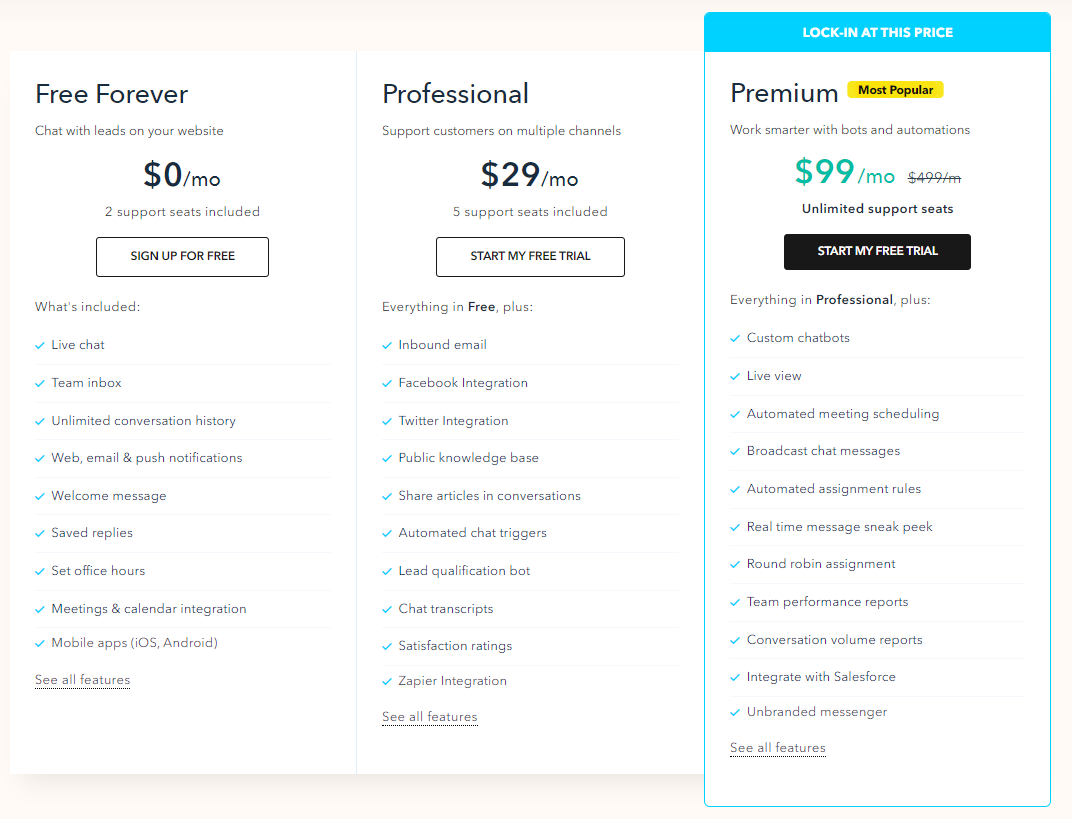
You can create simple customer service chatbots on a free plan. But you can also have wider functionality on a 14-day free trial period.
The choice of the chat bot service might be tricky. We picked the 7 best tools that offer chatbot software and divided them by tasks they can do for you.
Learn how to choose chatbot software
Hope this guide showed you how useful chatbots can be for business, and now you’re eager to launch the first chatbot yourself! One tricky thing left is the choice of software. There’s no universal service that suits everyone. So here are a few tips to help you decide.
- Decide which problems you want a chat bot to resolve. Do your potential customers leave your website unqualified? Does your team struggle with the endless flow of queries? These tasks require chatbots with different functionality. So before choosing a service, make sure it has solutions that meet your needs.
- Check if you can integrate a chat bot into your workspace. For more effective work of a chatbot, a platform you selected should allow integrations with other services you already use. This way, chatbots will be an integral part of your ecosystem. For example, an integration with your CRM system and messenger would facilitate the process of data gathering.
- Make sure chat bot software fits your budget. There are plenty of services that offer chat bot software. Industry leaders offer top software with respective pricing. But you can always look for cheaper alternatives with similar functionality. Maybe you don’t even need all the solutions they offer? Just go back to our first point and think about the issues you need to resolve 😉
Best practices for AI chatbots in 2026
A chat bot can support you greatly, only if you set it up carefully. The conversation is too long and irrelevant? The visitors get bored and close the chat. And it’s the best-case scenario!
In the worst one, visitors get irritated and leave your website.
To help you avoid such situations, the Dashly team prepared a few tips to learn how to launch an effective and helpful chatbot on your website.
Let’s overview them!
Read also:
Unlocking Revenue: Sales Funnel Management Guide for 2024
A Beginner’s Guide to Using Sales Funnel Templates
Define your goal before building
Cliché? Sure! But it’s probably the most important advice of all. Before opening the builder, think about what task you want your chat bot to do.
Improve user experience?
Qualify leads?
Great!
Notify customers of product updates?
Amazing!
Make your goal clear.
Let’s take Dashly for example. In the blog, you can find chat bot campaigns for eCommerce and SaaS. So we launched a chatbot that offers a demo to those who downloaded the campaigns map.
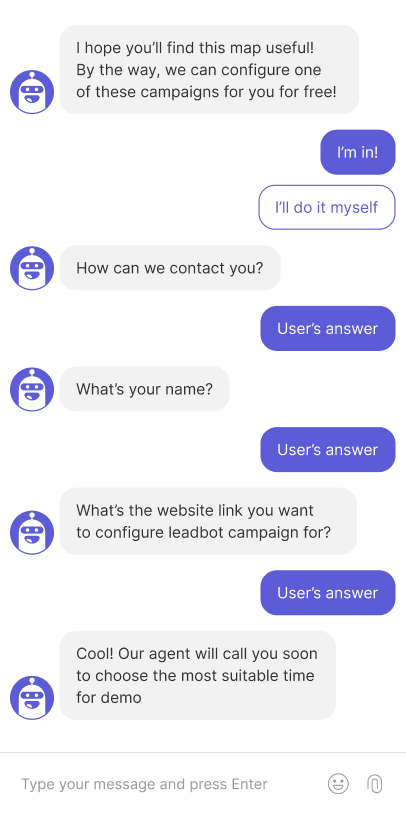
Book demos. That was the main objective of the chatbot. So we constructed a short and straightforward conversation, not to bore customers and get primary information for the sales team.
Always be relevant and targeted
Of course, you can launch a chat bot to engage all website visitors. But the most effective chatbots are the targeted ones. Offer additional products to those customers that just completed the purchase. Lend a hand to those who wander around your pricing page for a while.
In Dashly, the finance service team used a chatbot to collect feedback from new feature beta testers.
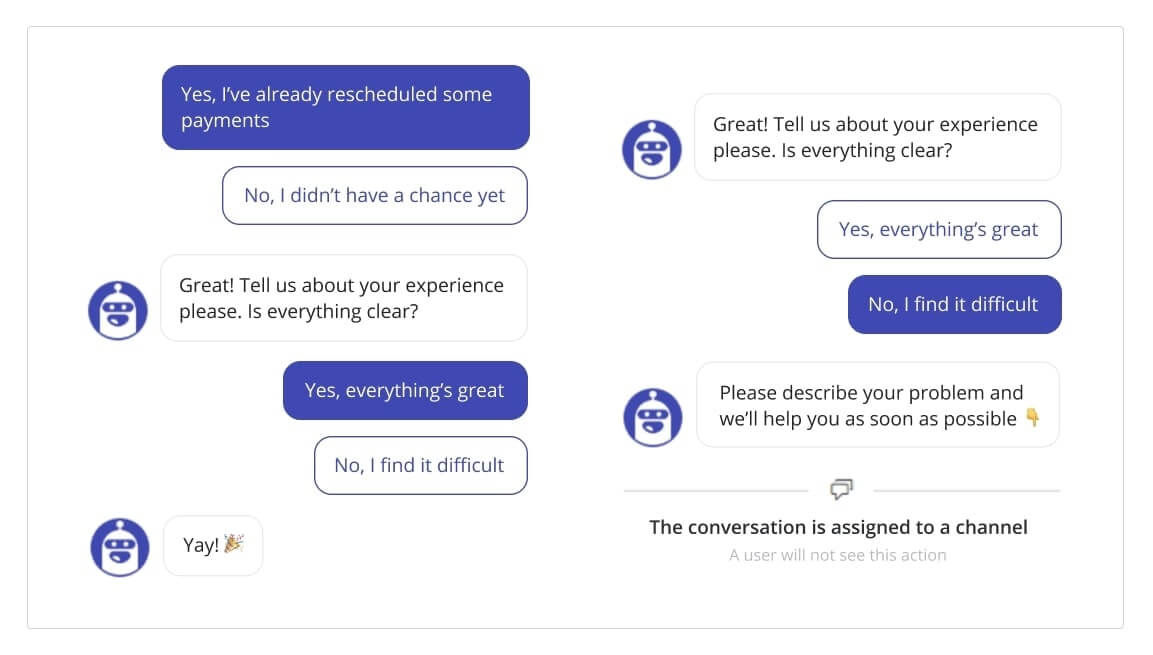
The more relevant your campaign is, the higher the chances that a user engages in the conversation. Personalized communication is possible even with a chatbot!
Keep conversations short and focused
While trying to stay relevant and precise in the conversation, don’t overload visitors with questions. The fewer steps they have to make, the better. The optimal number of messages will depend on the situation and the level of user’s engagement.
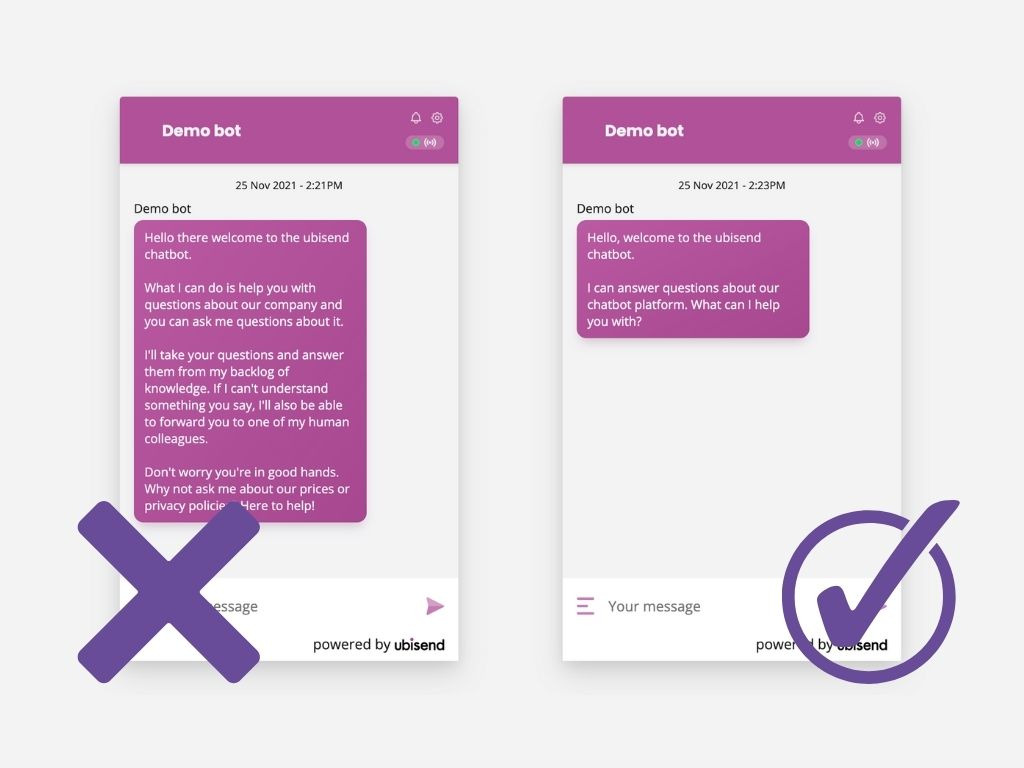
If a user got to your website for the first time, it’s nice to have a small talk first. But if you can get rid of unnecessary messages, do it. If a prospect is on the product page for quite a while, cut to the chase and offer help straightaway.
Let AI agents and human agents work together
Well-set chatbots will carry out a lot of different tasks for you. It can support customers with navigation, deal with FAQs, and collect data. These are simple issues that could be solved automatically. But if a more complex issue occurs, set up your chatbots to route conversation to human agents.
This division of responsibilities leads to a more comfortable user experience. Besides, always give website visitors a chance to contact live agents at any step of the conversation.
Believe me, you don’t want to deal with an angry customer who called for human assistance for 30 minutes!
Free expert insights to boost your marketing strategy and raise conversion to a target action by 10%
Make your chatbot friendly and human-sounding
Be very careful introducing visitors to your product. The colder a lead is, the less pressure you should put on them. Chatbots are always online to support your visitors at any step of their customer journey on the website, in messenger, or on social media.
Be polite. You can also use images and GIFs, they make communication more informal.
A chat bot is like a character for me. This is not a person, but it should speak the human language. Humanness occurs when you get rid of clichés and officialese.
Hallway tests are very helpful. You find unclear statements and rewrite them.

Humanness is important. However, always be honest and clarify that a user is talking to a robot. Trust and mutual respect are crucial for any business.
These are not all the insights from Dashly experts. Check out another chat bot best practices and take the best out of this tool!
Examples of the Dashly customers’ chatbots
Check out how Dashly chatbots look on customer’s website!
There are much more chat bot examples.
FAQ on chatbots
Frequently asked questions about chatbots for business
An AI chatbot for business is software that uses artificial intelligence to handle customer conversations automatically — answering questions, qualifying leads, and routing requests to the right team member. Unlike rule-based bots that follow fixed scripts, AI chatbots understand natural language and hold contextual conversations. In 2026, the most advanced business chatbots are AI agents that take actions: booking meetings, updating CRMs, and sending follow-up sequences without human involvement.
For B2B SaaS teams focused on inbound lead qualification, Dashly’s AI Qualifier Agent qualifies website visitors 24/7 and routes hot leads to sales. For enterprise support at scale, Intercom and Drift are established options. For small teams on a budget, Tidio and Gist offer AI-powered chat from under $30/mo. The best choice depends on your primary use case: lead qualification, support deflection, or demo booking automation.
Pricing ranges from free (basic plans at Tidio, HubSpot) to custom enterprise contracts. Most SMB-focused AI chatbot tools start at $20-$50/mo. AI agent platforms like Dashly use custom pricing based on traffic volume and agent configuration. Most vendors offer a 7-14 day free trial — enough time to test qualification flows and measure conversion impact before committing.
A chatbot answers questions. An AI agent takes actions. A chatbot tells a visitor the pricing starts at X. An AI agent asks qualifying questions, scores the lead, books a demo into the sales calendar, and updates the CRM — all without human input. For B2B SaaS companies, AI agents deliver significantly higher ROI than passive chatbots because they convert intent into pipeline automatically.
The fastest path: (1) Choose a platform with a visual builder — Dashly, Tidio, or Intercom all offer drag-and-drop flow editors; (2) Define the goal: lead qualification, support FAQ, or demo booking; (3) Write the conversation flow with 3-5 qualification questions; (4) Set up CRM integration so qualified leads are pushed automatically; (5) Launch and monitor conversion rate for the first 7 days. Most teams go live in under 2 hours.